Data Products on Snowflake: A Reference Architecture for SaaS Teams
A technical guide to building data products on Snowflake — multi-tenancy, semantic layers, embedding, AI, writeback, and the architectural decisions that matter.

The difference between a feature and a system
Adding charts to a SaaS product is not the same as building a data product. The first is a feature. The second is a system.
A feature serves one screen. A data product serves a roadmap. It has owners, a lifecycle, governance, monetization, and architectural commitments that ripple through every layer of your stack. Most teams discover this distinction the hard way — six months into shipping dashboards, when the next set of customers wants writeback, the legal team asks where the data went for AI features, and the warehouse bill triples.
This article walks through the architecture that prevents that. It's a reference, not a tutorial. We will cover the layers in order, name the decision points, and call out where teams typically fail. Throughout, we use Snowflake as the foundation — partly because the architectural pattern is most mature there, partly because it's where most warehouse-native data products are being built today.
The audience is technical: data platform leads, staff data engineers, and engineering leaders sponsoring customer-facing analytics work. If you are choosing a BI tool today, this isn't the article — read it before you start choosing, when you are still designing.
What we mean by "data product"
A data product is a productized analytics experience delivered to end users — usually customers — with its own UX, lifecycle, and value proposition. It has owners, SLAs, a roadmap, and is treated as a first-class output of the data team, not a side-effect of internal reporting.
It helps to position the term against two others.
An internal dashboard exists to inform people inside your organization. Sales sees pipeline. Finance sees burn. Operations sees throughput. These are essential, but they are tools, not products.
Customer-facing analytics is what most SaaS teams ship first — a dashboard inside the product showing customers their own usage, performance, or outcomes. This is closer to a data product but often stops at "show, don't act."
A data product, properly built, has four traits:
- Productized UX: The interface is designed, branded, and tested. It's not a generic BI portal bolted onto a side route. Users interact with it the way they interact with the rest of your product.
- Governed data lifecycle: The data behind it has owners, quality checks, and known sources. When something breaks, there's a runbook and a person.
- Operational closure. Users can read, but also act. They update forecasts, approve records, trigger workflows. The product completes the loop from insight to action.
- Monetization potential: The product creates value that can be priced — directly through tiered access, or indirectly through retention, engagement, or competitive differentiation.
The Snowflake Marketplace and broader data mesh conversations have made the term data product mainstream over the past three years. Teams adopting Zhamak Dehghani's data mesh principles use it to describe domain-owned, self-service data assets. Snowflake itself uses the term extensively in its documentation. We use it here in the SaaS-product sense — the data product is what your customers see and use.
Why Snowflake specifically
The architectural pattern in this article works on Databricks and BigQuery too, with different trade-offs. We focus on Snowflake because three of its primitives make data product creation noticeably cleaner.
1. Secure data sharing
Snowflake treats data sharing between accounts as a first-class operation — share a database, a schema, or specific tables to another Snowflake account with no copying, no ETL, no synchronization. This makes patterns like "give my customer their own data slice in their own Snowflake account" architecturally trivial when they would otherwise require a separate export pipeline.
2. Snowflake Cortex
LLM inference inside the warehouse, against data that never leaves. Available models include Meta's Llama family, Mistral, Anthropic's Claude, and DeepSeek. For a data product that needs AI features without sending customer data to third-party APIs, this collapses what would otherwise be a multi-month compliance and architecture project.
3. Per-second consumption billing
A data product serving a small but real customer base doesn't require a fixed compute commitment. Warehouses spin up on query, suspend on idle. Cost scales with actual usage in a way that's predictable per query.
Honest caveat: Databricks has stronger native support for ML workloads and Delta Lake's lineage, and BigQuery has BI Engine for sub-second dashboard caching. Snowflake's specific strength is the maturity of its data-sharing primitives and the depth of its third-party ecosystem. If your team is already on a different warehouse, the pattern in this article still applies — substitute the warehouse-specific names where appropriate.
The reference architecture, end to end
Five layers, top to bottom. The customer interacts at the top. The warehouse holds truth at the bottom. Everything in between is decisions about how data and context flow.
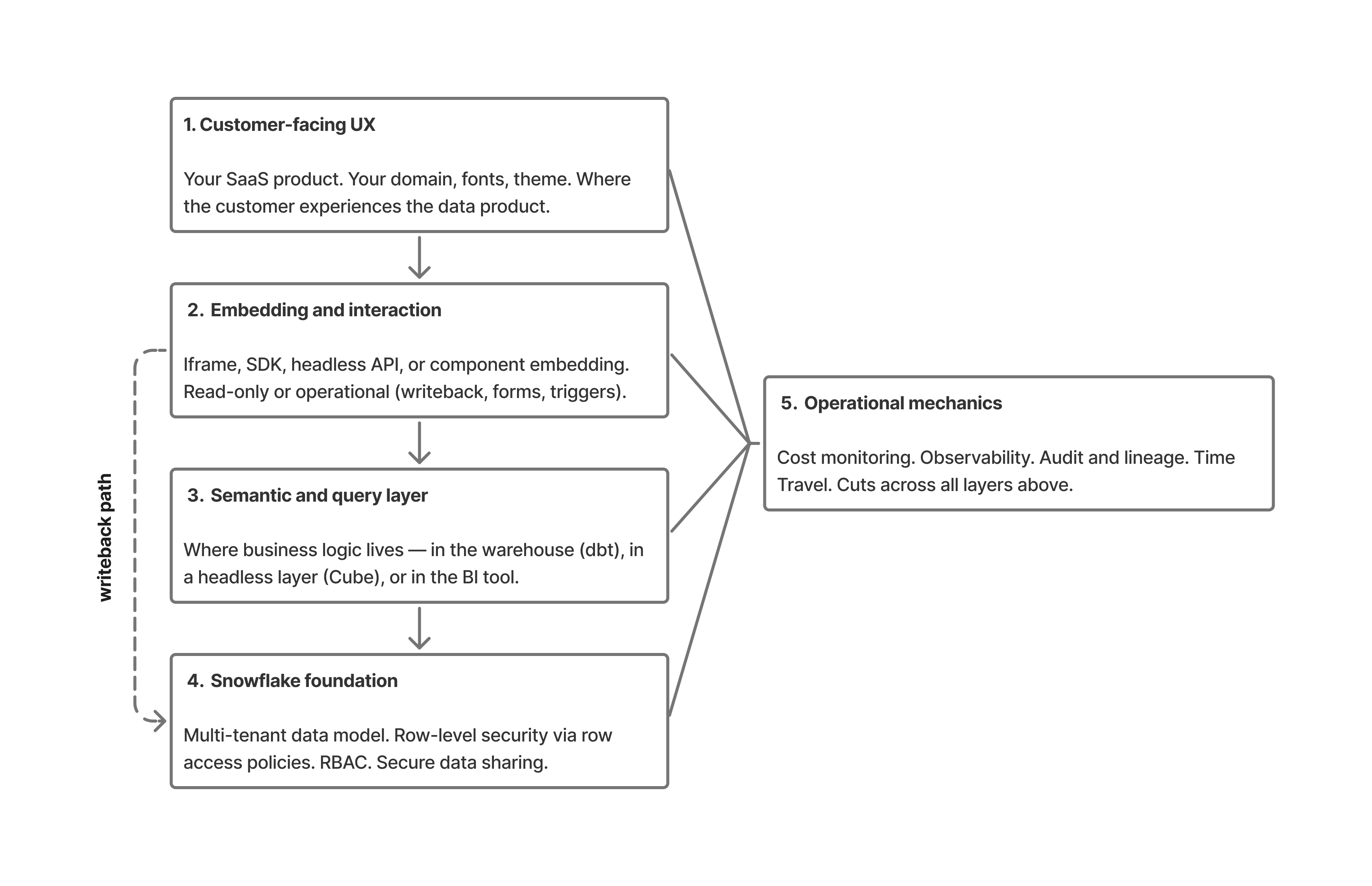
A query starts in the UX layer (1) — the customer clicks a filter in your SaaS product.
The embedding layer (2) translates that interaction into a request, sent through the semantic layer (3) where business logic resolves "active customer" or "qualified pipeline" into actual SQL.
Snowflake (4) executes the query under the user's session context, with row-level security policies and RBAC enforcing what data they can see.
Results return up the stack, rendered into the dashboard the customer sees. If the user takes an action — submitting a forecast, approving a record — the writeback path travels back down through governed SQL writes, with the warehouse remaining the source of truth.
Operational mechanics (5) — cost, audit, observability — run across all four layers above, capturing what happened and what it cost.
Layer 4 — The Snowflake foundation
This is the longest section because it's where most teams either succeed or fail before they ever pick a BI tool. The foundational decisions you make here define what's possible above.
Multi-tenant data isolation
The first decision is how to model multi-tenancy. There are three patterns, each with trade-offs.
Database-per-tenant. Each customer gets their own Snowflake database. Strongest isolation. Easiest mental model — if customer X's data is corrupted, only their database is affected. Hardest to operate at scale: schema migrations run N times, query performance is hard to optimize centrally, and you'll write substantial automation just to keep accounts in sync. Works well below 50 tenants. Becomes operationally painful above 200.
Schema-per-tenant. Each customer gets a schema inside a shared database. Middle ground. Most growth-stage SaaS teams land here. Schema-level RBAC handles isolation, schema migrations are scriptable, and you can still query across tenants for internal analytics with admin privileges. Works well from 50 to roughly 1,000 tenants.
Shared schema with tenant ID and row-level security. All tenants share the same tables, distinguished by a tenant_id column. RLS policies enforce isolation at query time. The most scalable pattern — works at any scale Snowflake itself can handle. Also the most dangerous if RLS is misconfigured: a single missed policy is a cross-tenant data leak. Mandatory above 1,000 tenants, where the operational cost of database- or schema-per-tenant becomes prohibitive.
A common hybrid: shared schema with RLS for the analytical tables, separate schemas for tenant-specific configuration data and metadata. This gets you scale where it matters and isolation where it's clearer to reason about.
Row-level security at the warehouse
RLS belongs in the warehouse, not in the BI tool. This is non-negotiable for a data product.
Snowflake implements RLS through row access policies — SQL functions that return true or false based on the current session's context. A typical policy looks like this conceptually: a function that compares the requesting user's tenant_id (set in session context) against the row's tenant_id column, returning true only when they match. The policy is applied to base tables once. Every query against those tables — whether from the BI tool, a notebook, an ad-hoc analyst, or another application — inherits the policy automatically.
The reason this matters: if you implement RLS in the BI tool instead, every other tool that queries the warehouse needs its own RLS implementation. A misconfigured BI tool, a curious analyst running a notebook, or a future product that connects directly all bypass the security model. With RLS at the warehouse, the security boundary is enforced regardless of who or what is asking.
For data products serving thousands of tenants, the RLS policy is also where you implement column-level masking — hiding PII fields, masking financial figures, enforcing geographic data residency at the column level.
Role-based access control and authentication
Data products typically use service accounts, not user accounts, for the BI tool's connection to Snowflake. The BI tool authenticates as a service account with a baseline role. When a customer logs into your SaaS product and triggers a query, the BI tool's connector sets a session-level context — usually the customer's tenant_id, role, and any user-specific permissions — before issuing the query.
This pattern lets you serve thousands of customers from a single connection without managing thousands of Snowflake users. The session context is what RLS policies read to determine access. The Snowflake account stays clean; the application layer manages user-to-tenant mapping.
Token-based authentication (OAuth, key-pair auth) is preferred over password-based service accounts for production. Keys rotate, tokens expire, audit logs show who did what.
Secure data sharing
For some data products, the right architecture is to give your customer a Snowflake share rather than embed a dashboard. They get instant access to a read-only slice of data inside their own Snowflake account. They can query it with whatever tools they already use. No exports, no API rate limits, no integration project.
This is overkill for most consumer-grade data products — your customers don't have Snowflake accounts. But for B2B data products serving enterprise customers (think industry benchmarking, supply chain data, market intelligence), secure data sharing eliminates the need to build delivery infrastructure. The Snowflake Marketplace is essentially this pattern productized: you publish a listing, customers discover it, they get access.
Warehouse sizing for multi-tenant workloads
Two patterns dominate. The first is one shared warehouse per tier of customer (e.g., one warehouse for Free, one for Pro, one for Enterprise), with auto-scaling enabled. Cost is predictable, isolation is good enough for most cases, and tier-based performance becomes a feature you can sell.
The second is per-customer warehouses for high-value or noisy-neighbor-sensitive customers. More operational overhead, more cost transparency. Used by teams with regulatory commitments to compute isolation or with a few customers whose query patterns would otherwise dominate a shared warehouse.
Auto-suspend should be aggressive (60 seconds is reasonable for customer-facing dashboards), and result caching should be enabled — Snowflake's result cache is one of the cheapest performance improvements available, and it just works.
Layer 3 — The semantic and query layer
Most teams underweight this layer. It's the difference between a data product that scales and one that becomes unmaintainable in 18 months.
Where business logic lives
When a dashboard asks "what is monthly recurring revenue for this customer," some component has to translate that intent into SQL. The question is: which component?
There are three answers.
In the warehouse. Define MRR as a model in dbt, materialized as a Snowflake view or table. Every tool that queries Snowflake sees the same MRR. The semantic definition is version-controlled, reviewed in pull requests, tested. This is the architecturally cleanest answer. Trade-off: it requires a working analytics engineering practice and discipline to keep models current.
In a headless semantic layer. Cube, dbt's Semantic Layer, or similar. The semantic definition lives outside both the warehouse and the BI tool, accessible via API. Multi-tool access is the main benefit — your BI tool, your AI agent, and your reverse-ETL pipeline all see the same metric definitions. Trade-off: another component to operate, and the ecosystem is younger than dbt's.
.png)
In the BI tool. Definitions live inside the BI tool's metric or semantic layer. Fastest to start. Worst for governance — if the BI tool changes or you add a second one, the definitions don't follow. Most teams accidentally end up here and regret it.
For a data product, the warehouse-first pattern is usually right. The semantic definitions are part of the product, not part of the BI tool's configuration. They need source control, code review, and lifecycle management. Putting them in the BI tool turns "what does revenue mean" into a UI configuration question, which is the opposite of what a data product needs.
The shift-left pattern
A real example, drawn from a customer Astrato has worked with — IAG Loyalty (the loyalty business behind Avios and British Airways' loyalty programs). Their data team made the architectural move of pulling logic out of the BI tool and into Snowflake:
In the BI tool. Definitions live inside the BI tool's metric or semantic layer. Fastest to start. Worst for governance — if the BI tool changes or you add a second one, the definitions don't follow. Most teams accidentally end up here and regret it.
For a data product, the warehouse-first pattern is usually right. The semantic definitions are part of the product, not part of the BI tool's configuration. They need source control, code review, and lifecycle management. Putting them in the BI tool turns "what does revenue mean" into a UI configuration question, which is the opposite of what a data product needs.
The shift-left pattern
A real example, drawn from a customer Astrato has worked with — IAG Loyalty (the loyalty business behind Avios and British Airways' loyalty programs). Their data team made the architectural move of pulling logic out of the BI tool and into Snowflake:
"We completely decoupled the logic from the front end, moving it into Snowflake. Now, Astrato acts as the shop window for everything happening in Snowflake, while all computation and governance remain in code within our data warehouse."
— Chanade Hemming, Head of Data Products, IAG Loyalty
Source: IAG Loyalty customer story.
This is the architectural commitment you're making when you put the semantic layer in the warehouse. The BI tool becomes a presentation layer over governed data, not a calculator that owns the definitions.
Live query versus extract
For a data product, live query against the warehouse is almost always correct. Extracts mean stale data, refresh failures (which become customer-visible incidents), and a separate compute layer to administer. They also defeat the economics of warehouse-native architectures — you've already paid for the warehouse's compute.
The exceptions are narrow: very high-concurrency dashboards over very large tables, where caching at the BI layer can reduce warehouse cost meaningfully. Even here, Snowflake's result cache and materialized views often solve the problem inside the warehouse, without introducing an extract layer.
If you're choosing a BI tool and it doesn't support live query against Snowflake as a first-class mode, it's the wrong tool for a data product.
Query optimization patterns
Three Snowflake features matter for data product workloads:
Materialized views for frequently queried, slow-changing aggregations. Pre-aggregate "monthly active users" or "total revenue by region" so dashboards don't recompute the rollup on every load.
Automatic clustering on large tables filtered by tenant or date. Clustering keys keep the data physically organized so tenant-scoped queries don't scan the full table.
Search optimization service for point lookups against large tables — useful for data products that surface specific records (a customer looking up their own transaction history).
These are tools, not requirements. Most data products start without them and add them when query patterns reveal what's needed. Don't pre-optimize.
Layer 2 — The embedding and interaction layer
How analytics actually appear inside your product. Four embedding modes, each with trade-offs.
Four embedding modes
Iframe embedding. The dashboard renders in an iframe inside your product. Simplest to implement — drop in a URL with a signed token. Weakest for customization. Fine for internal portals, weak for customer-facing analytics where the dashboard needs to feel native.
JavaScript SDK embedding. The BI tool ships a JavaScript SDK. Your product imports it and renders the dashboard inside your DOM. Stronger customization, more control over interactions, deeper integration with your product's state management.
Headless / API-first. Your application handles the entire UI. The BI tool returns query results via API. Most engineering investment, most flexibility. Used when the dashboard is genuinely a custom UX, not a configurable BI surface. Cube and similar tools are popular here.
Component embedding. Single charts, KPI tiles, or modules dropped into your existing UI. Often the right level for SaaS products that want analytics as one feature among many — not a dedicated "Analytics" tab, but a chart inside the existing customer dashboard.
White-labeling depth
"Supports white-labeling" means very different things across BI tools. The honest checklist:
- Custom domains (the dashboard loads from analytics.yourdomain.com, not from the vendor's domain)
- Fonts and theme (matching your product's design system, not just primary colors)
- CSS hooks (the ability to override specific elements when defaults don't match)
- Branded exports (PDFs, Excel, PowerPoint with your branding, not the vendor's)
- Removed vendor watermarks and "Powered by" badges
- Custom error states and loading states
The gap between a tool that "supports white-label" and one that genuinely lets you ship something native is large. The test: would your customers know which BI tool you're using if they didn't already? If yes, the white-label is incomplete.
Read-only or operational
This is where the data app concept enters. A read-only data product is a feature. A data app — one that supports writeback, forms, approvals, and triggered actions — is closer to an operational tool. The architectural implications are significant.
A read-only product needs only a query path: customer requests data, query runs, results render. A data app also needs a write path: customer takes action, parameterized SQL writes to the warehouse, audit log captures what happened. The write path needs governance — role-based permissions on what can be written, validation that the input is sane, optional approval workflows for sensitive changes.
The platforms that support this well are platforms that were built with writeback as a first-class concern. Astrato is one example; Sigma's input tables are another. Most legacy BI tools (Tableau, Power BI, Looker in its classic form) treat writeback as a peripheral feature or don't support it.
Where Astrato fits
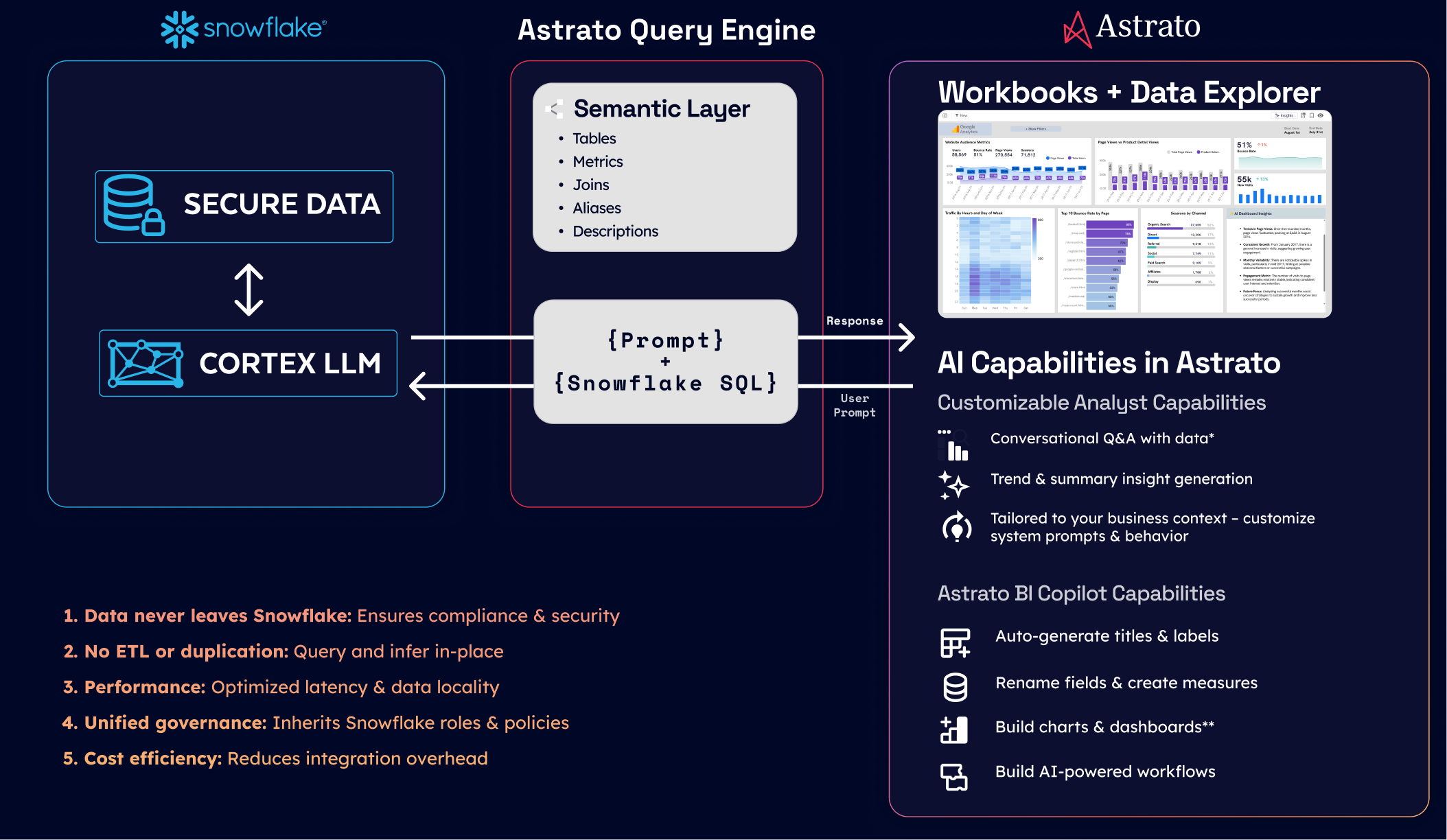
Astrato is a warehouse-native BI platform that supports component, group, and workbook embedding, with pixel-perfect white-labeling, live-query architecture, and writeback to Snowflake under governed SQL. It's one of several platforms that fit this layer of the architecture.
Other platforms in the same architectural slot include:
- Sigma — warehouse-native, strong on input tables
- Sisense — with the Compose SDK for headless embedding
- Looker —when paired with Looker Embed
- Cube — headless
- Embeddable — purpose-built for embedded analytics.
The point isn't which platform to pick. The point is that this layer of the architecture has a specific job — turn warehouse queries and writes into a customer-facing experience — and the platforms that do it well share common traits: live-query, governed semantics, real white-label depth, and an operational write path.
Layer 1 — AI integration without breaking governance
Most BI tools added LLM features in 2023 and 2024. Most of them did it the easy way: send schema, sample queries, and sometimes whole result sets to OpenAI or Anthropic APIs. For internal dashboards this is usually fine. For a customer-facing data product handling tenant data, it's a governance problem you need to address explicitly.
The data egress problem
When a user asks a natural-language question — "what was our revenue last quarter" — the BI tool's AI feature typically does the following: extract relevant table schemas, sample some rows for context, pass everything to an LLM API, parse the LLM's response into a SQL query, run the query, return results.
.png)
For your customer's data, this means rows from their tables left your environment, traveled to a third-party LLM provider, and may have been logged or used for model training. Most enterprise contracts forbid this without explicit data processing agreements. Most consumer-facing data products quietly do it anyway and hope nobody notices.
Snowflake Cortex as the answer
Cortex runs LLM inference inside Snowflake. The data never leaves the warehouse. Available models include Anthropic's Claude family, Meta's Llama models, Mistral, DeepSeek, and Snowflake's own Arctic. For a customer-facing data product, this is the architectural answer: AI features that respect the same governance as everything else in the warehouse.
Trade-offs: Cortex's model selection is narrower than going direct to OpenAI or Anthropic, and price-per-token is higher than commodity API pricing. For most data product use cases, the governance benefit outweighs the cost difference.
Multi-LLM architectures
Real data products often need flexibility. Cortex for sensitive customer data, OpenAI or Gemini for non-sensitive operational queries, BYO LLM for customers with specific compliance requirements. The BI tool's job is to support routing — sending queries to the appropriate model based on data sensitivity and use case.
Tools that lock you into one LLM (their own or a partner's) limit your future flexibility. Tools that support multi-LLM — and allow customers to bring their own — preserve it.
Semantic context for AI
LLMs don't know what "revenue" means in your data model. If they're asked to translate "show me revenue" into SQL without context, they'll guess based on column names and produce results that look right but are subtly wrong.
The semantic layer (Layer 2) is what fixes this. When the LLM has access to definitions — "revenue is the sum of paid_amount from transactions where status = 'completed', grouped by month" — it produces correct SQL. Without the semantic layer, AI features in your data product are hallucination engines pointed at customer data.
This is why teams who skipped the semantic layer end up redoing it when they add AI features. The semantic layer is what makes the AI feature credible.
Layer 5 — Operational mechanics
The boring layer. The one that determines whether the data product survives in production.
Writeback as the operational hinge
When users update forecasts, approve records, or enter data through a dashboard, those writes need:
- Governed SQL. Parameterized statements, role-checked at the BI tool level and again at the warehouse level. Never raw SQL from the client.
- Audit trails. Who wrote what, when, from which session. Snowflake's query_history and access_history views capture most of this automatically; the BI tool fills in the rest.
- Optional approval workflows. For sensitive fields (budgets, forecasts, anything financial), an approval step before the write commits.
- Concurrency handling. Two users updating the same record need to be serialized — last-write-wins at the database level, or row-level locks for collaborative scenarios.
The architectural pattern is straightforward: the BI tool issues governed writes through a service connection, the warehouse holds truth, the application layer never writes directly. Every change is logged at the warehouse, regardless of which BI feature triggered it.
Cost monitoring
Multi-tenant data products produce surprising Snowflake bills if you're not watching. The patterns that help:
- Tagged warehouses per tenant or tier. Tags flow through to Snowflake's resource monitors and account_usage views, so you can attribute cost to specific customers.
- Resource monitors with alerts. Set thresholds per warehouse; Snowflake notifies before you hit the cliff.
- Result caching. Often-asked questions return from cache without re-running the query. Free performance.
- Auto-suspend. Aggressive defaults (60 seconds for customer-facing warehouses) prevent idle compute from accumulating.
- Scheduled materialization. For dashboards that show the same aggregations repeatedly, materialize the rollup overnight rather than recomputing on every load.
Observability
The tools you'll lean on:
- Snowflake's query_history view for warehouse-side query patterns, cost, and latency percentiles.
- access_history for who-saw-what audits.
- The BI tool's own usage telemetry for dashboard-level usage, error rates, and time-to-first-byte.
For a data product, the metric that matters most is time-to-render at the customer's end. Track P50, P95, P99 — and watch P99 closely. The customer who gets a 12-second dashboard load is the customer who churns.
Data lifecycle and Time Travel
Snowflake's Time Travel — the ability to query data as it existed at a previous point in time — is a feature most teams don't appreciate until they need it. When a customer says "the dashboard showed wrong numbers three days ago," Time Travel lets you query the data as it was three days ago and confirm whether the bug is in the data or in the rendering.
For regulated industries, Failsafe (Snowflake's seven-day disaster recovery) and Time Travel together cover most compliance requirements for data retention and integrity.
The build path: a six-month outline
Translating the architecture into a project plan. Not a Gantt chart — a sequence of decisions and milestones.
Months 1–2: Foundation. Decide the multi-tenancy pattern. Implement RLS. Set up RBAC and service accounts. Run a security review with whoever needs to approve customer data flow. Stand up a non-production environment that mirrors production.
Months 2–3: Semantic layer. Build the core metric definitions in dbt or your equivalent. Validate them against current internal reporting — if MRR in the new system doesn't match MRR in the existing dashboard, find out why before going further.
Month 3: Embedding pilot. Pick one customer-facing dashboard, embed it into one product surface, behind a feature flag for one tenant or a small pilot group. Resist scope creep — the goal is to prove the path end to end, not to ship the full product.
Months 4–5: Hardening. Writeback paths if the product needs them. Audit infrastructure. Cost monitoring and resource monitors. Customer-tier isolation testing. Load testing under realistic concurrency.
Month 6 and beyond: Launch and iterate. GA to a tenant cohort. Watch the metrics that matter (P95 latency, error rates, warehouse cost per tenant). Expand surface area as confidence grows.
The six-month timeline assumes a small dedicated team with existing Snowflake maturity. Real-world ranges from three months (mature team, simple product) to twelve months (greenfield team, complex product). The architectural decisions are what determine whether you're at the fast end or the slow end.
Anti-patterns: what breaks data products on Snowflake
Five mistakes that kill data products in production.
1. Per-tenant database explosion without operational tooling
Database-per-tenant works at 10 customers and breaks at 100. If you're choosing this pattern, build the automation for migrations, monitoring, and provisioning before you have 50 tenants — not after.
2. Row-level security implemented in the BI tool instead of the warehouse
A misconfigured BI tool sees everything. A future BI tool, ad-hoc analyst, or downstream application sees everything. RLS belongs at the warehouse, where every consumer of the data inherits it.
3. Logic embedded in dashboards
Twenty dashboards, twenty subtly different versions of "revenue," no source of truth. By the time the discrepancies are obvious, the cleanup is a six-month project.
4. Extract-based BI on a multi-tenant warehouse
Defeats Snowflake's compute model, introduces stale data and refresh failures into customer-facing analytics, and fragments your governance. If your BI tool's primary mode is extract-and-reload, it's the wrong tool for a data product.
5. AI features that send customer data to third-party APIs without explicit permission
The compliance breach you don't see coming. Either use in-warehouse AI (Cortex), get explicit data processing agreements with your LLM provider, or don't ship the AI feature.
Closing
Building a data product on Snowflake is a layered architectural commitment, not a tool choice. The decisions in Layer 4 (the warehouse) determine what's possible in Layers 1–3 (the customer experience). The decisions in Layer 5 (operations) determine whether what you build survives contact with real customer usage.
Most teams shouldn't build the entire stack themselves. The pattern is what you internalize; the implementation usually involves a warehouse-native BI platform that handles Layers 2 and 3, leaving your team to focus on the foundational architecture (Layer 4), the semantic layer (Layer 3 in part), and the operational mechanics (Layer 5).
If you want to see what this architecture looks like in practice, Astrato's Snowflake integration page covers the BI/embedding side of the pattern, and the demo apps gallery shows working data products built on it.
Ready to experience next-gen analytics?
See how Astrato runs natively in your warehouse.