Writeback in BI: How Data Apps Turn Dashboards into Operational Workflows
Writeback in BI turns dashboards into data apps that run operational workflows. The patterns, the mechanics, and what to look for in a BI platform.

Writeback in BI turns read-only dashboards into bidirectional data apps that run real operational workflows. A practical guide to what writeback does, the three patterns it unlocks in real deployments, and what to look for when you're evaluating it.
The VP of Finance is mid-quarter and wants the forecast adjusted in the same view where the variance shows up. The CS lead wants to flag an at-risk account from inside the health dashboard, not in a separate CRM tab. Operations wants to override a reorder point and have the new number stick across other systems downstream. The data team wants business users to fix the wrong product mapping themselves, with an audit trail, rather than filing a ticket with development teams and waiting two weeks.
None of these are dashboard requests. They're operational workflows. They need the data to move both ways: out to the screen, and back to the warehouse.
This is where most BI tools stop, and where the conversation about writeback in BI and data apps starts. This article is about what writeback actually does, the patterns it unlocks in real deployments, and how to evaluate it when you're choosing a BI platform.
What writeback in BI actually means
Writeback in BI is the capability that lets a business intelligence tool write data back to the source data warehouse. A user takes an action inside the dashboard — types a value into a form, clicks an approve button, comments on a row, adjusts a forecast assumption — and that action lands as a record in the underlying data warehouse. Not as a CSV export. Not as an overnight sync. As a governed write, executed under SQL through stored procedures or direct DML, with the same permissions and audit posture as anything else the warehouse stores.
It helps to be precise about what doesn't count. Exporting a dashboard to Excel, editing the spreadsheet, and re-importing it isn't writeback — it's a workaround for the absence of writeback. A separate planning tool that pulls from the warehouse, accepts inputs, and syncs back overnight isn't writeback either. It's an integration that fragments your data across other systems and adds latency between the action and the analysis. True writeback means the action and the analysis happen in the same place, on the same data source, at the same time, with multiple users collaborating against the same source data without stepping on each other's changes.
Three reasons this matters now.
- First, the cloud data warehouse has become the system of record for most enterprises. Snowflake, Databricks, BigQuery and traditional SQL databases (including SQL Server) hold the operational truth, not just the analytical archive.
- Second, the analytics layer that sits on top of the warehouse is the natural place for people to act on that data, because it's already where they go to look at it.
- Third, the cost of every workaround — the export-edit-import loop, the separate planning tool, the spreadsheet attached to an email — has become measurable. Hours per week per user. Errors per quarter per process. Trust deficit per stakeholder. Writeback is the capability that removes the workarounds and lets authorized users edit data directly inside the analytics layer, with full data validation and audit lineage.
Dashboard vs. data app: the shape change
Writeback is the capability. A data app is what you build with it.
A dashboard is read-only by design. Data flows one direction: out of the warehouse, through the BI layer, onto the screen. The user consumes. They might filter, drill, or ask a question, but they don't change anything in the underlying data set. The dashboard is optimised for showing.
A data app is bidirectional. Data flows both directions. The user sees the current state, and they also act on it — submit a value, approve a request, override a default, resolve an exception. The action writes back to the warehouse under governed SQL, with role-based permissions, audit trails, and the option to roll changes back. Data validation rules enforced at the warehouse layer mean users can't enter the wrong format or push data updates that violate referential integrity. The data app is optimised for doing.
Most "we need a dashboard" requests in 2026 are actually data-app requests in disguise. The team needs to do something with the data, not just look at it. They need real-time data entry, real-time adjustments, and a collaborative tool that lets multiple users contribute without overwriting each other. Dashboards survived as the default because BI tools couldn't do anything else. That's changing.
The shift from dashboard to data app is also a shift in who uses the analytics layer day-to-day. A dashboard's audience is executives and analysts who want to see numbers. A data app's audience is the people who own the operational process — the sales manager committing a forecast, the finance partner approving the budget line, the CS lead working the health queue, the operations lead adjusting production schedules. They aren't "checking analytics." They're doing their jobs, and the analytics layer is where they do them.
If you're running this evaluation on a specific stack, the same shape change shows up vendor by vendor — we've broken down what it looks like on Databricks in our AI/BI vs. data apps guide.
Three patterns where writeback earns its place
The use cases worth understanding fall into three patterns. They look different on the surface — different teams, different data, different stakeholders — but they share a structure. In each one, a workflow that used to require leaving the BI tool to do anything meaningful now happens inside it, as part of one continuous analysis flow.
Pattern 1: Master data and dimension management
Master data is the work nobody wants to own. Product codes that disagree between systems. Customer records that exist three times under three slightly different names. Regional hierarchies that mean one thing in finance and a different thing in commercial. The standard fix is a multi-year MDM programme run by IT, scoped on a separate platform, with a separate budget. Most of these projects either never finish or produce a master data layer that the business doesn't actually use, because it doesn't match the way the business thinks about its data.
Writeback changes the shape of the problem. Instead of building MDM as an IT project, you build it as a data app inside the BI tool, with a user-friendly interface that puts the work in the hands of the people who actually understand the data. Controllers, data managers, category specialists. They see the raw records as they arrive from multiple source systems, side by side, and they decide which ones represent the same underlying entity. They map those records to a single corporate standard inside the BI interface. Writeback pushes the unified dimensions back to the warehouse. Transformations downstream (in dbt or equivalent) enforce the standard. An audit trail records who mapped what, when, and why — the foundation for maintaining data integrity across acquisitions, regions, and product lines.
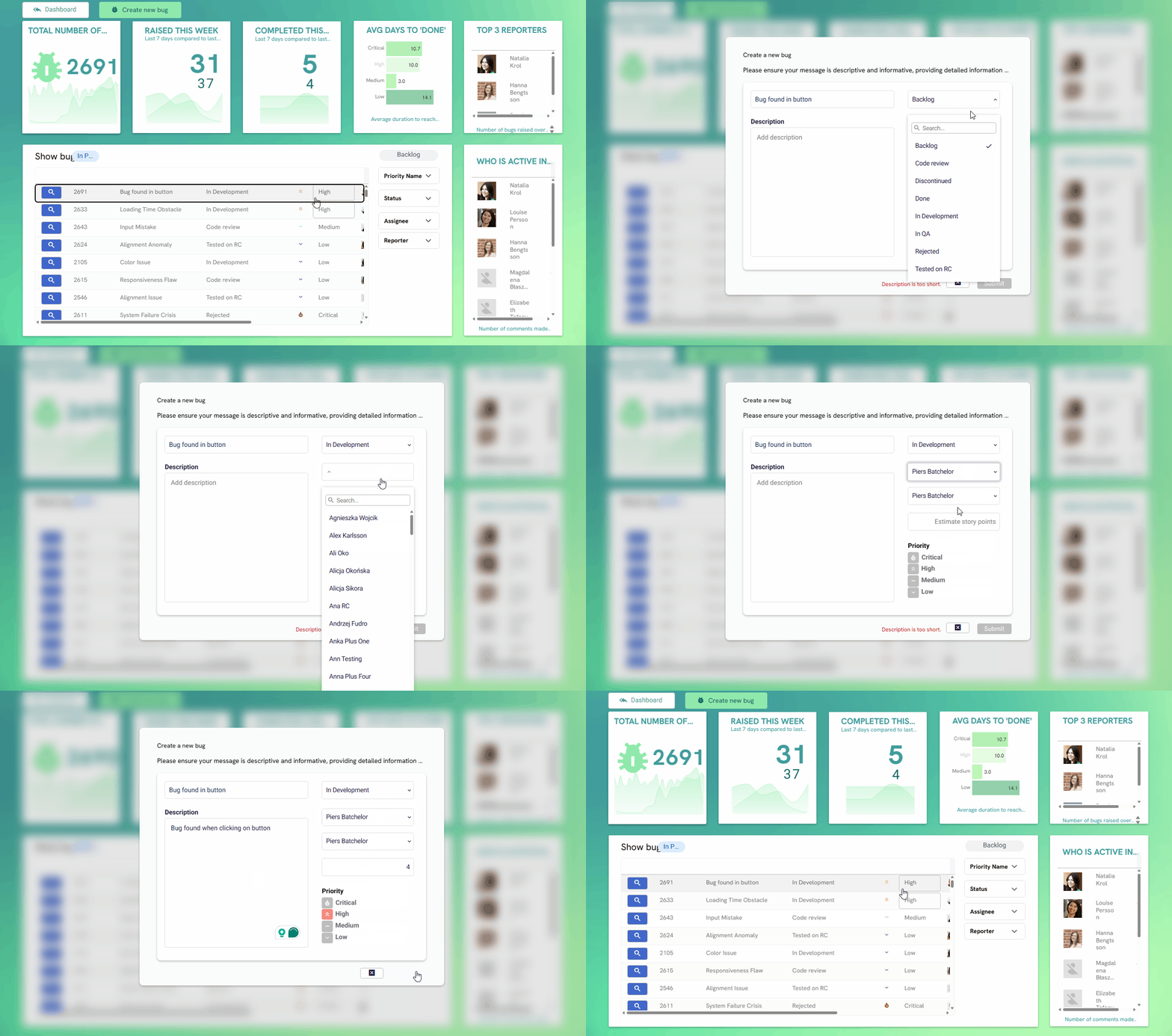
The Belgian pharmaceutical group Ceres Pharma runs this pattern in production. Ceres has grown through 14 acquisitions into 23 legal entities across five countries, each carrying its own ERP, CRM, and logistics partners. The same product can appear in three source systems with three different codes and three different descriptions. Rather than trying to unify the ERPs (a project that would have taken years), the team built an app called the Metadata Manager: business users see every product as it appears across sources, map it to a unified corporate code, enrich it with the dimensions they actually need, and write the result back to Snowflake.
The detail worth copying is the economics. Ceres had already paid significant money for a product information system that exposed four product fields. They needed twelve. The choice was either to buy another single-purpose SaaS tool they'd use ten percent of, or to build the app themselves with writeback. Building it took less time than evaluating alternatives would have, and didn't require development teams or external tools.
If your organisation has grown through M&A, or if you're running parallel ERPs that nobody has the budget to consolidate, this pattern probably solves a problem that's been on your roadmap for two years.
The point isn't that you can build an app inside your BI tool. The point is that the people closest to the data are the ones doing the mapping, in days rather than quarters, with full audit lineage and the data accuracy that downstream reporting tools depend on.
Pattern 2: Operational planning and approval workflows
Walk into the finance, FP&A, or operations function of any large business and you'll find the same thing: a set of critical operational workflows held together by linked Excel files. Budgets that circulate between forty entities by email. Mapping tables on shared drives that determine how a P&L rolls up. Sales forecasts that get aggregated by someone copy-pasting from sixty submissions. Cash flow projections that depend on a workbook nobody fully understands. When a single file breaks, the dependencies cascade, and someone spends a week unwinding the mess.
The standard BI response is to replace the dashboards while leaving the workflow alone. The result is predictable: users export the new dashboards to CSV and rebuild their pivot tables. You've added a tool without removing a problem.
Writeback changes the calculus, because it lets you replace the workflow without replacing the output. The data entry, the approval routing, the validation, the feedback processes, the audit trail — all of that moves into a data app on top of the warehouse, where multiple users can interact with the same source data without conflicts. The Excel and PowerPoint outputs the business depends on get generated from the same governed data, on demand, in the exact format the auditors expect.
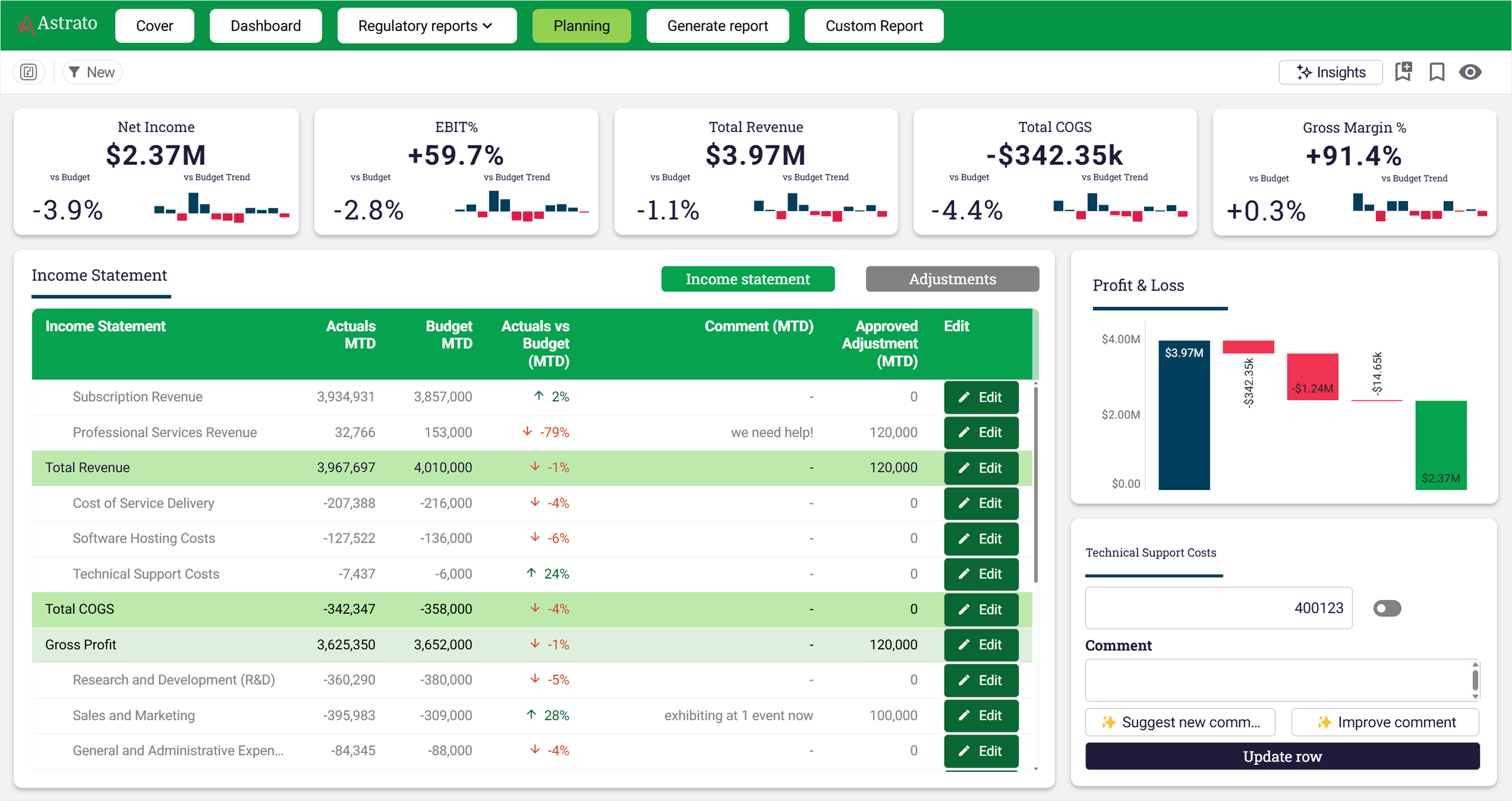
GlobalData runs this pattern across its finance function. Roughly 250 accountants used to spend four or five person-weeks each month producing management accounts by manually copying CSV exports into pre-formatted Excel templates. The team rebuilt the workflow on Astrato and Snowflake. P&L mapping is now controlled through four mapping tables behind a validation gate, so a change to a business unit hierarchy propagates everywhere in 15 minutes instead of requiring edits to hundreds of spreadsheets. Unmapped journals are flagged through the month, so accountants fix the data at source rather than discovering the gaps at year-end. The management accounts pack still drops into the same Excel template the board has always reviewed, generated in one click from live data.
The same shape works for budgeting, forecasting, and project management workflows, where most finance and operations teams hit the spreadsheet wall hardest. Each business unit enters its budget into a form inside the data app — interactive data entry validated against business rules, with the project status visible to every authorized user in real time. The submission routes through an approval chain with role-based permissions. The audit trail lives in the warehouse. The consolidated budget exports to whatever template the CFO uses. One global music publisher operationalised exactly this pattern across 40 entities; the rebuild took six weeks.
If you're a finance or operations leader looking at the workflows your team runs every month, the test is simple: is the spreadsheet your system of record, or is it the format you deliver in? When it's the system of record, you have an operational problem dressed up as a productivity problem. Writeback lets you fix the operational problem without forcing anyone to give up the format, and turns scattered spreadsheets into a truly collaborative tool that the whole team works in.
Pattern 3: Scenario modelling and what-if analytics
Most analytics is descriptive. You're looking at what happened. The harder, more valuable question is what would happen if. What if we lowered the price by five percent? What if we cut this product line? What if a competitor launched at this price point next month? Traditional dashboards can't answer those questions on the fly, because they have no mechanism for the user to change an input and see the consequence.
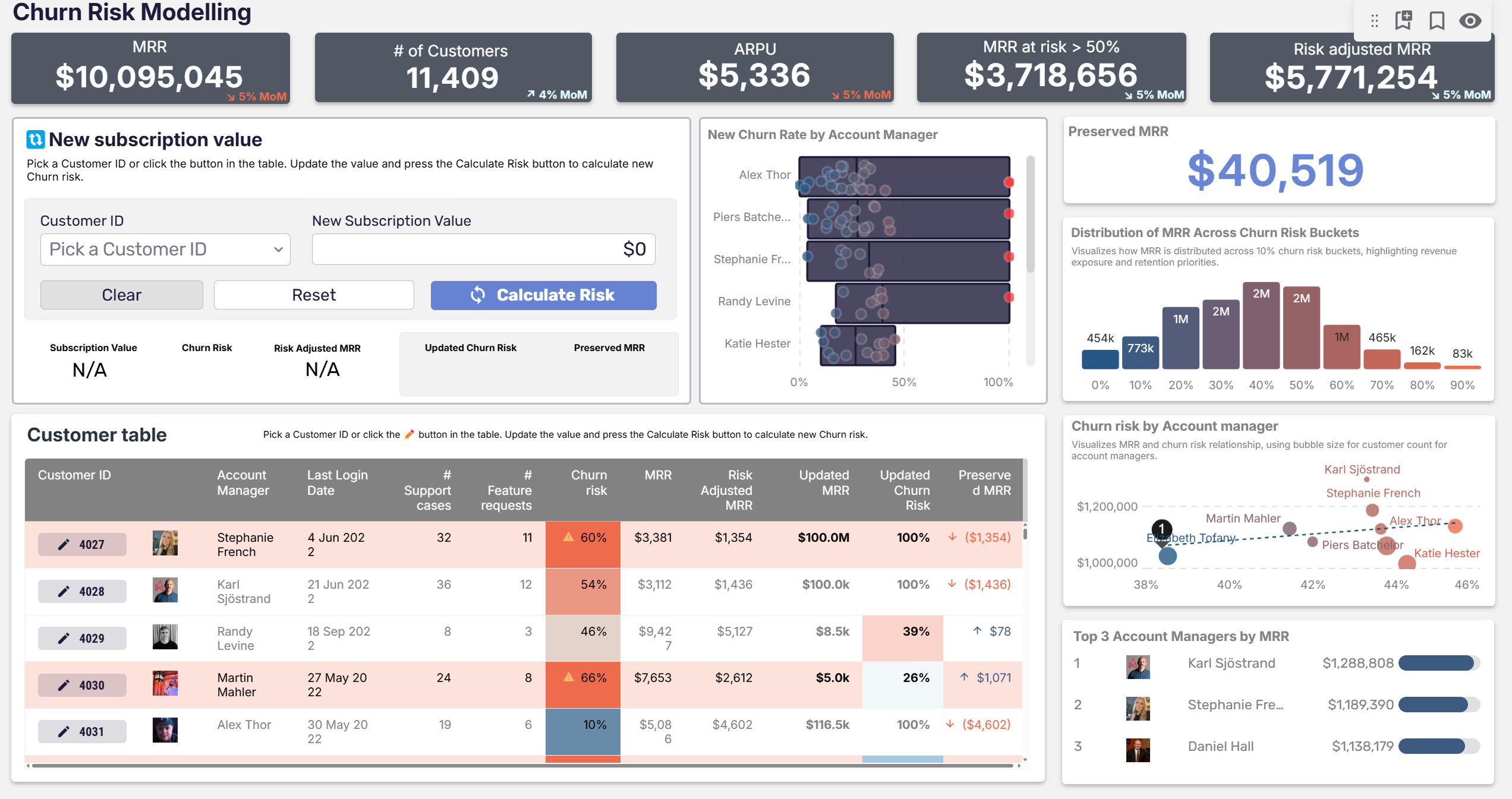
Writeback is what makes interactivity possible without writing custom code or commissioning a custom visual. A user enters a hypothetical value through the dashboard. The value gets written into the warehouse as a temporary record or a scratch table. Downstream calculations re-run against the modified data. The result appears in the same view, in real time, without leaving the analytics layer. No coding expertise required.
Elbiil, a Danish company serving electric vehicle manufacturers, sells a benchmarking product where car companies compare their pricing, specs, and leasing terms against the rest of the Danish EV market. The interesting question for an Elbiil customer isn't "how does our current price compare?" It's "how would a new spec or leasing offer perform against the competition?" Elbiil's customers spec the hypothetical vehicle directly inside the dashboard. Writeback captures the input. The competitive analysis runs against it instantly.
The last sentence is the one worth dwelling on. A team building an analytics product from scratch would normally have to build the interactive layer themselves: form handling, data validation, state management, web services into the warehouse, recalculation logic. That's a six-month engineering project at minimum. Native writeback collapses it into configuration — a no-code solution to a problem most teams treat as a code problem. The same pattern applies internally:
- Risk teams model limit extensions before approving them.
- Sales operations model quota changes against current pipeline.
- HR plans headcount restructures against current cost.
- FP&A teams stress-test cash flow projections against multiple scenarios.
Any time the answer to "what if" needs to land in seconds rather than days, writeback is the mechanism that gets you there.
What ties the three patterns together
On the surface, master data management, operational planning, and scenario modelling don't have much in common. Different teams, different data, different stakeholders. But the structural change underneath is the same in each case: an operational workflow that used to require leaving the BI tool to do anything meaningful now happens inside it. The dashboard stops being a viewer and starts being the system.
This is what makes writeback a category shift, not a feature. A BI tool that can only read from the warehouse is a reporting layer. A BI tool that can write back to the warehouse is an application platform that happens to do reporting. The implications run further than they look.
- If your dashboards can capture inputs and route data submissions through approval flows, you can stop building separate operational tools for processes that don't justify their own platform.
- If your BI layer enforces governance on writes as well as reads, you can put data ownership in the hands of business users without losing control.
- If your analytics product can model complex business processes natively — empowering business users to update data, run scenarios, and generate creating actionable outputs — you can sell interactivity instead of static reports.
Most enterprises that adopt this pattern find that two or three operational workflows move into the BI layer in the first year, and the count compounds from there. The teams that move first spend less time stitching tools together and less time chasing data accuracy across third party tools. The teams that don't spend the next three years explaining to their boards why the dashboards still don't match the spreadsheets.
How to evaluate writeback in a BI tool
If you're shortlisting BI platforms with writeback, five capabilities separate the ones architected for it from the ones that bolted it on.
Governed writeback under SQL
The write should inherit the warehouse's permission model, not bypass it. Role-based access on writes is non-negotiable; if the BI tool can't enforce row-level edit permissions, you're going to end up with a governance problem that surfaces at the worst possible moment. The audit trail should record who wrote what, when, and what the previous value was — robust security that lets only authorized users submit data directly. If the answer to "can we roll this back?" is "depends on whether we caught it in time," the writeback layer isn't enterprise-ready.
Live query, not extracts
The data app should reflect the warehouse state without an extract refresh cycle, because writeback is meaningless if the next user sees stale data. If the BI tool ingests data into its own engine and queries that engine, real-time data input either won't work or will be eventually consistent in ways that break workflows. The deeper case for live-query architecture as the foundation of operational analytics is laid out in real-time analytics on Snowflake — same principle applies regardless of which warehouse sits underneath.
No-code surface for the workflow logic
Building an approval chain or a data validation rule shouldn't require a software engineer. If the only way to define "finance partner approves under $25k, finance director approves under $100k, CFO approves above" is custom code, you've bought a platform you can't maintain. The whole point of the data-app pattern is to put the workflow in the hands of business users — the people who own the process.
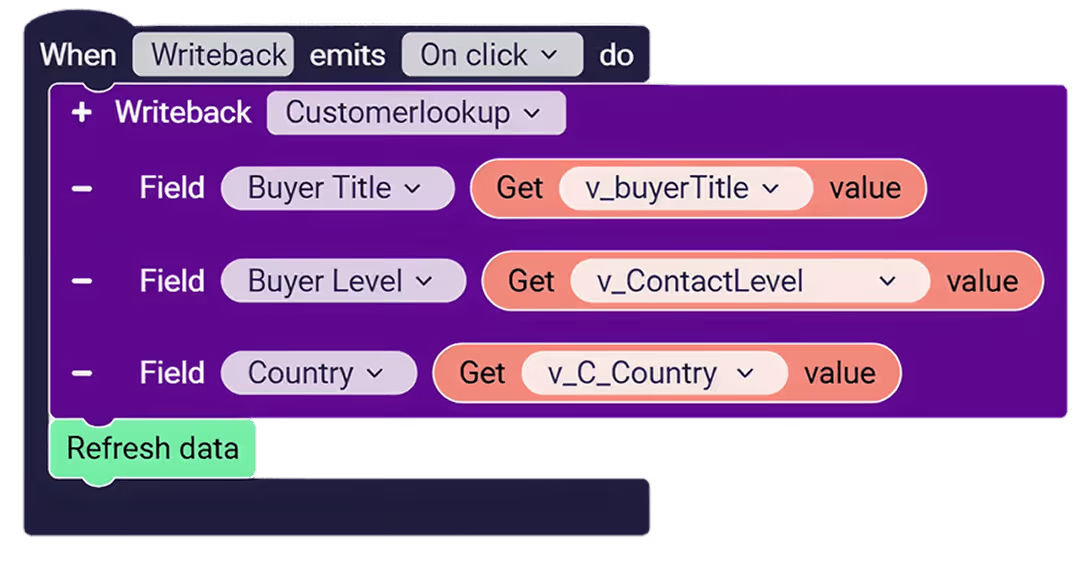
Audit, versioning, and rollback
Every change needs to be visible in an audit log queryable by the data team. Time-travel against the warehouse's native capabilities (Snowflake Time Travel, Databricks Delta history) should be the default, not an add-on. Performance metrics on writeback activity (how many submissions, by whom, against which records) should be queryable the same way reads are.
Multi-warehouse fit
If your stack today is Snowflake, your stack in three years is probably Snowflake plus Databricks plus a Postgres operational store plus whatever the next analytical engine turns out to be. A writeback layer that only works against one warehouse is a future tax. The platforms architected for the long term treat warehouse choice as a configuration option, not a foundation, and connect equally to Snowflake, BigQuery, Databricks, ClickHouse, Supabase, and SQL Server.
Astrato's writeback capability and data apps and workflows pages walk through the technical specifics — governed SQL writes, action blocks, approval chains, audit trails, and the live-query architecture that underpins all of them.
See what writeback and data apps look like in practice
Astrato is the warehouse-native BI platform for guided self-service, embedded analytics, and operational data apps. Book a demo or start a free trial to see writeback, approval workflows, and live-query architecture working over your own warehouse data.
FAQ
What is writeback in BI?
Writeback in BI is the capability that lets a BI tool write user actions back to the source data warehouse. When a user submits a forecast, approves a budget, comments on a row, or maps a dimension inside a dashboard, that action lands as a governed record in the warehouse under SQL, with role-based permissions and an audit trail. It's what turns a read-only dashboard into an operational data app that runs real business workflows.
What's the difference between a dashboard and a data app?
A dashboard is read-only. Data flows one way, from the warehouse to the screen. Users consume. A data app is bidirectional. Users see the current state and act on it: submit a value, approve a request, override a default. The action writes back to the warehouse, governed by the same SQL permissions and audit posture as anything else stored there. Most operational use cases — planning, approvals, exception management, scenario modelling — are data-app shaped, not dashboard shaped.
Can Power BI or Tableau do writeback?
Both have limited writeback capabilities, usually delivered through extensions, custom Power Apps integrations, or third-party plugins. Neither was architected with writeback as a first-class capability, which shows up in the operational experience: governance has to be re-established outside the warehouse, workflows like approval chains require custom development from development teams, and the data path is rarely live-query against the warehouse. If your use case is genuinely read-only dashboarding, either tool can work. If your use case includes writeback, approvals, or operational workflows, warehouse-native BI platforms architected for the data-app pattern are a better fit.
What kinds of business problems is writeback best suited for?
Three patterns show up most often. Master data and dimension management, where business users unify records across multiple source systems and write the unified dimensions back to the warehouse. Operational planning and approval workflows, where budgeting, forecasting, cash flow projections, and adjustments happen inside the BI tool instead of in email and Excel. And scenario modelling, where users enter hypothetical values and see the impact in real time. The common thread: any workflow that currently lives in the gap between dashboards and operational systems is a writeback candidate.
Is writeback secure? How is governance handled?
In a warehouse-native architecture, writeback inherits the warehouse's existing governance posture. Permissions are enforced by the warehouse itself, not by the BI tool. Audit trails record every change. Row-level security policies apply to writes as well as reads, so only authorized users can update data directly. Native time-travel (Snowflake Time Travel, Databricks Delta history) means changes can be rolled back. The data never leaves your cloud warehouse — the BI tool reads and writes against it directly, which means your security and compliance perimeter doesn't expand.
Do I need a separate platform for data apps, or can my existing BI tool do this?
Depends on what your existing tool was architected to do. Dashboard-first BI tools can sometimes layer writeback on through extensions, but the data-app pattern (governed writes, approval workflows, no-code logic, live query against the warehouse) requires the capability to be designed in. If your team is running into limitations every time someone asks for an operational workflow that goes beyond "show me the number," that's the signal that the existing tool's architecture is at its limit. Warehouse-native BI platforms that treat writeback and workflows as first-class capabilities are the natural next step. If your current platform sits on the legacy side of that divide, our article on legacy BI vs. cloud-native BI explains why retrofitting writeback onto an extract-first BI tool tends to fail, and what the architectural reset looks like.
Ready to experience next-gen analytics?
See how Astrato runs natively in your warehouse.