
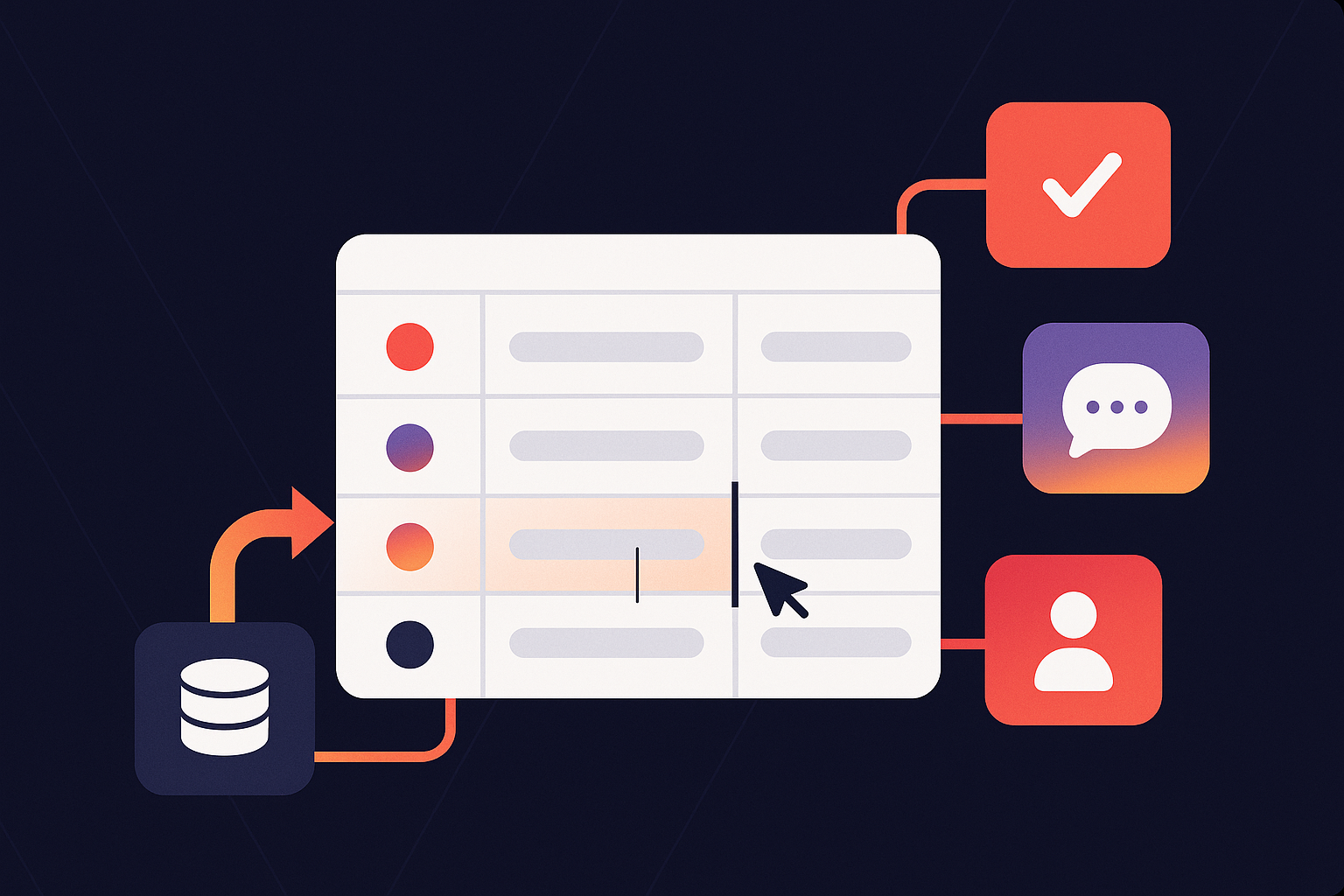
Every company has a shadow workflow nobody talks about.
It starts the moment someone notices a surprising number in a dashboard. A supply chain analyst screenshots it and posts it in a Slack channel called ops-urgent. Finance exports the same report to Excel to “run a quick adjustment” – a phrase that reliably produces six versions of a file and one version nobody remembers saving.
Meanwhile, a manager is asked to approve a budget change buried deep in an email thread with no context. Another team takes a screenshot of a screenshot, draws a circle around a metric, and writes “is this right??” above it.
None of this looks like analytics, yet this is what analytical workflows look like today.
The dashboards did not break. The workflows around them did.
The question teams now ask – quietly, repeatedly, almost sheepishly – is always the same across industries: “Can’t we just do this in the BI tool?”
As strange as it sounds, BI workflows are emerging as the missing link between data and decisions. They are turning dashboards – those glossy, static windows into the business – into interactive workspaces where updates, approvals, collaboration, and automation all happen in real time.
This shift is not incremental. It fundamentally changes what BI is for.
So… What exactly are BI Workflows?
A BI workflow is the sequence of actions – updates, approvals, comments, and triggers – that transforms insight into action without leaving the analytics environment.
If dashboards answer, “What’s happening?”, then BI workflows answer “What should we do next?”.
This idea didn’t come from vendors.
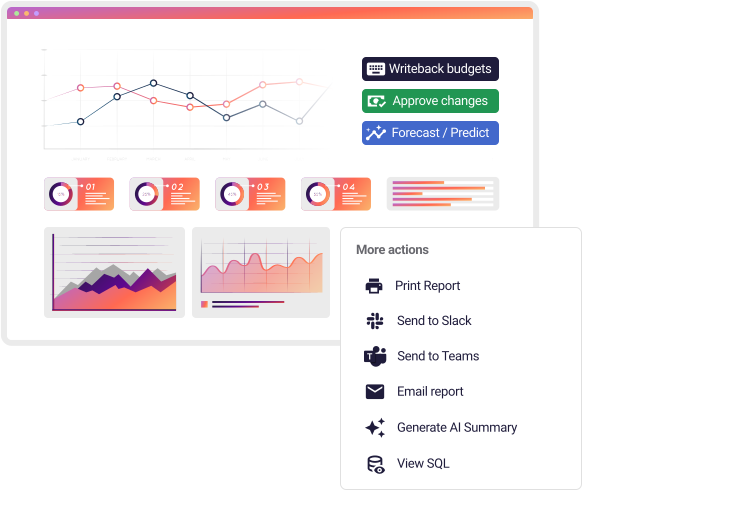
It came from end users who are exhausted by the operational chaos around data. In dozens of discovery calls, the same chorus keeps surfacing:
- “We want managers to update values directly here.”
- “Can’t we approve something inside the dashboard instead of emailing?”
- “Wait… you can actually change the data here?”
- “People keep emailing numbers back and forth. It’s impossible to track.”
These aren’t requests for nicer charts. They’re cries for better workflow infrastructure.
To understand the solution, we need to break workflows down into their building blocks.
Why BI without Workflows fails the business
Traditional BI tools were built with a single premise: insights live here, decisions happen elsewhere.
Every team now pays the operational price for that divide.
1. Read-only BI forces shadow workflows into spreadsheets
The moment someone needs to change a value – even a simple forecast assumption – the process collapses back into Excel. This does not happen because people love spreadsheets, but because most BI tools still treat data as untouchable.
This is why teams keep saying, “We want to plan without leaving the dashboard.”
Without writeback, truth fragments. Numbers mutate as they move from BI to Excel to email and back again, creating an unmanaged parallel workflow outside the warehouse. The absence of writeback does not merely slow teams down. It decentralizes reality.
2. Approvals disappear into unsearchable, unstructured channels
Approving a budget change, a pricing adjustment, or a supply chain exception should be a structured process.
Instead, approvals scatter across:
- email threads
- Slack DMs
- comments in exported spreadsheets
- verbal “OKs” no one remembers
What should be a governed workflow becomes forensics. And teams spend more time tracking decisions than making them.
Reconstructing an approval requires digging through inboxes, decoding filenames, and piecing together intent from context scraps.
It’s slow and error-prone. And it’s the opposite of how data-driven organizations are supposed to operate.
3. Conversations detach from the numbers that triggered them
The moment a number sparks a question, the conversation almost always escapes the BI tool that produced it.
A dip in revenue becomes a Slack thread. A forecast adjustment turns into an Excel comment. A strategic disagreement unfolds in email. Each piece of the dialogue drifts into a different system, detached from the data that prompted it.
One operations manager captured the chaos perfectly:
“Everyone has a different version of the truth – and a different place they keep it.”
What looks like a communication breakdown is really an architectural one.
Dashboards display the data but can’t hold the debate. Slack hosts the debate but never sees the data. Excel captures the edits but loses the lineage. Email collects the approvals but buries the reasoning. And through it all, the warehouse – the supposed source of truth – remains oblivious.
The human layer of decision-making, the “why” behind every change, dissolves into channels BI was never designed to understand.
4. The data warehouse is treated as a ledger, not a workflow engine
For decades, the data warehouse has been cast as the quiet accountant of the tech stack: meticulous, reliable, and completely hands-off.
You send it data, it files everything neatly, and you come back later to read the results. Orderly, yes. Useful, yes. Interactive? Not even close.
The irony is that modern warehouses are anything but passive. They can run complex logic, trigger workflows, and recompute entire models in milliseconds. They’re more jet engine than filing cabinet. The problem isn’t the warehouse – it’s the BI layer sitting on top of it, still behaving like the glass partition in a museum exhibit: look, don’t touch.
This is where warehouse-native, live-query platforms like Astrato flip the script.
When the BI layer sits directly on the warehouse, the distance between “see a number” and “do something about it” shrinks to zero. A forecast adjustment isn’t an offline detour, it becomes a live writeback. An approval isn’t an email chain, it’s a stored procedure firing instantly. Even commentary becomes structured data the warehouse can act on.
The effect is subtle but seismic: the warehouse stops acting like a ledger and starts acting like the workflow engine it was built to be. BI stops being the end of the process and becomes the place where the process actually runs.
The 4 Types of BI Workflows
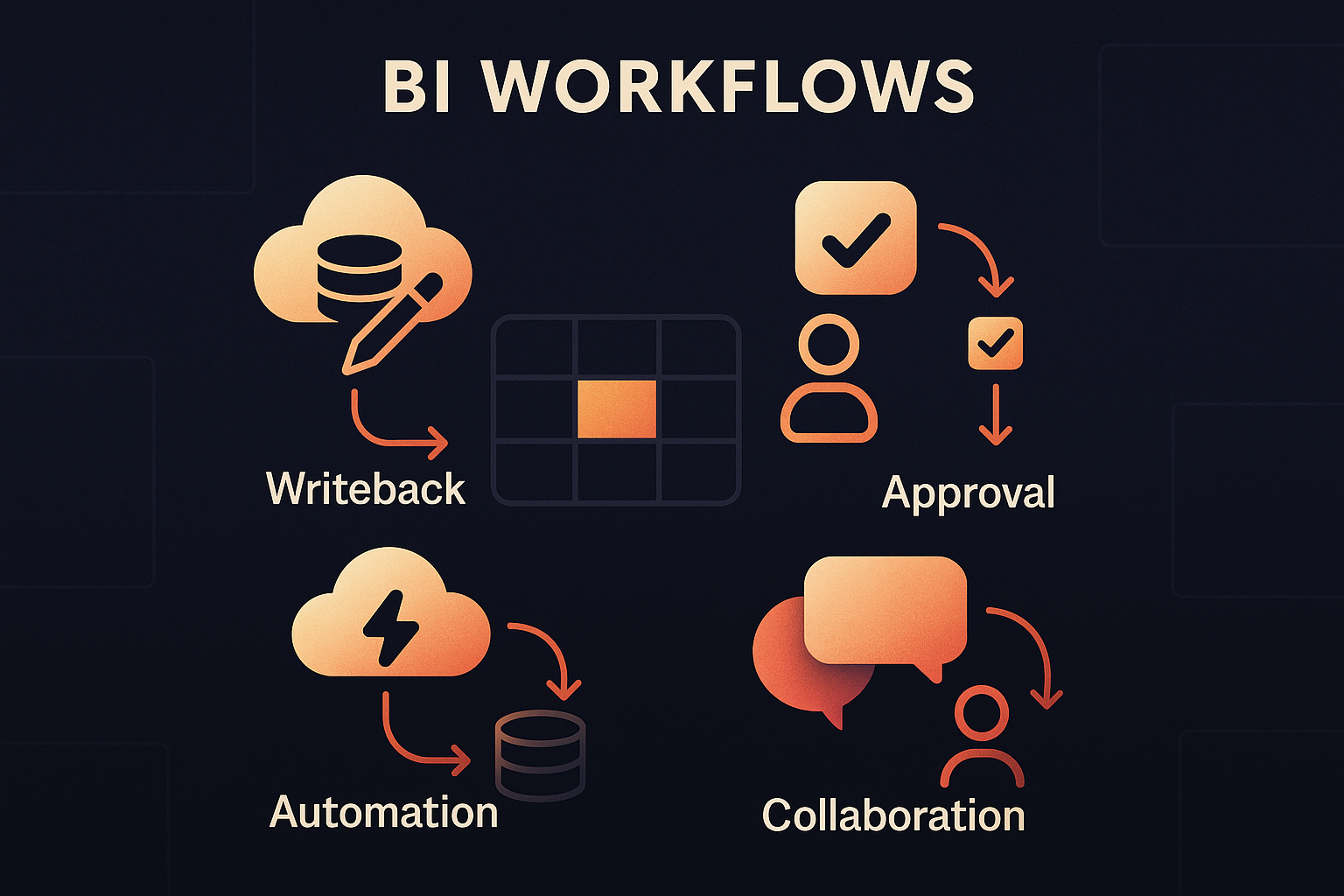
Modern BI workflows aren’t a feature set. They’re a shift in how companies move from seeing to doing. When these layers stack together, dashboards stop acting like digital billboards and start behaving like the operational nerve center of the business.
1. Update Workflows driven by writeback
Every workflow begins with a deceptively simple moment: someone needs to change something.
A sales rep adjusts a forecast. A regional manager updates a budget line. An analyst adds context explaining why inventory dropped last Tuesday. These are small, human-scale decisions, yet in traditional BI systems they trigger a cascade of exports, spreadsheets, and attachments.
Writeback collapses this detour. Modern BI workflows support governed inputs directly in the interface – editable tables, forms, dropdowns, sliders, and structured input fields – all writing back to warehouse tables.
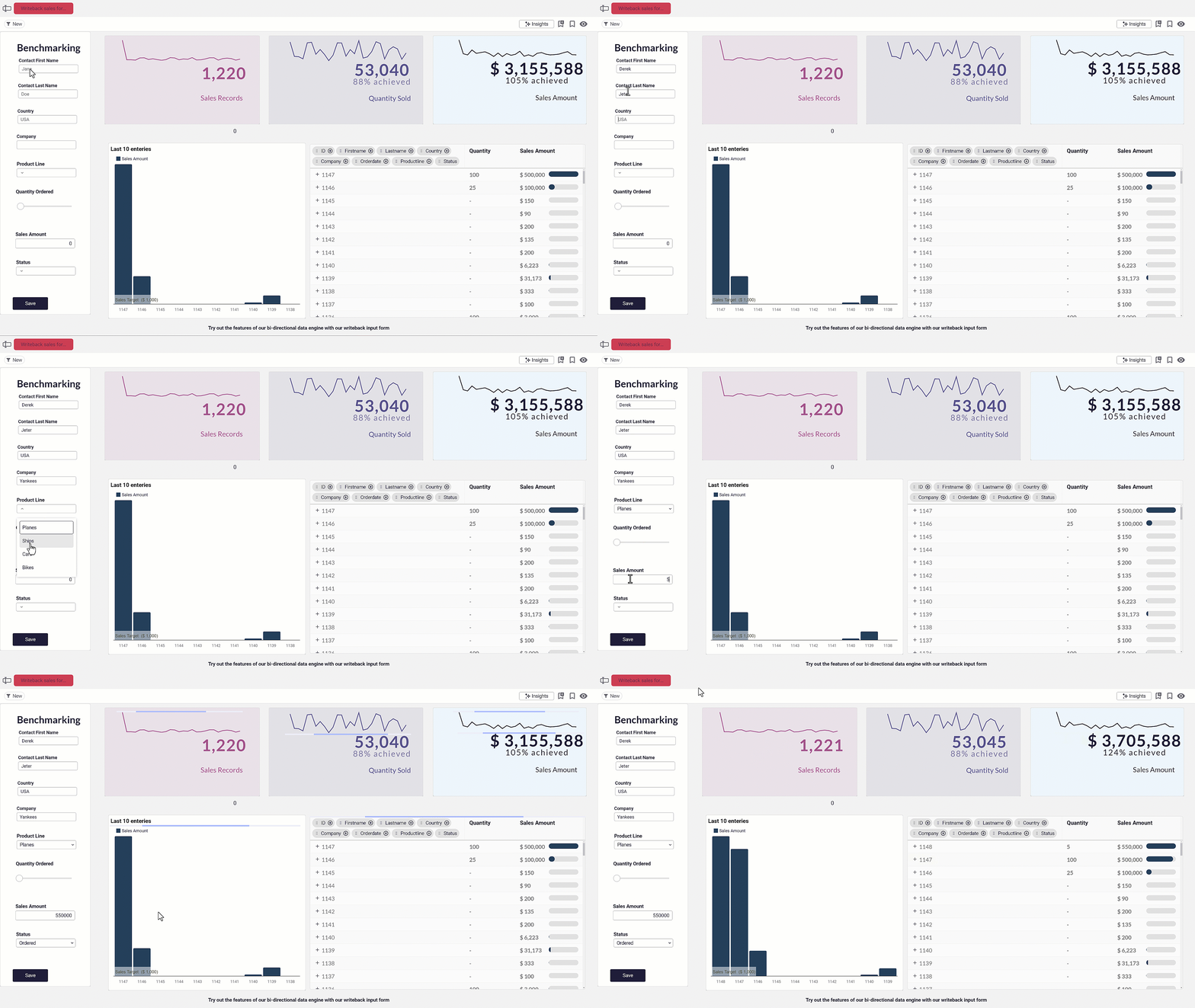
Critically, row-level security applies to writeback as well as read access. Users can only edit the rows and fields they are authorized to touch. The edit becomes part of the governed data model instead of floating loose in someone’s downloads folder.
This is often the moment people pause and ask, half surprised, “Wait… you can actually change the data here?” That reaction reveals how deeply the idea of BI as read-only has been internalized.
Writeback breaks that mental model. Once data can be changed in context, approvals, automation, and collaboration naturally follow.
👉 Explore this Bug Reporter Demo App
2. Approval Workflows with decisions anchored to context
Approvals are the pressure points of any business.
They decide whether a budget change goes through, whether a pricing exception is justified, whether a supplier deviation needs escalation, or whether a case review moves to the next stage.
These decisions shape the day-to-day rhythm of operations, yet they almost never happen anywhere near the data that prompted them.
Instead, approvals scatter across inboxes, Slack threads, forwarded PDFs, and hastily shared spreadsheets. Context evaporates. Accountability blurs. By the time a decision is made, the data that informed it may already be outdated.
Modern BI workflows pull approvals back to where they belong: the same interface where the numbers live.
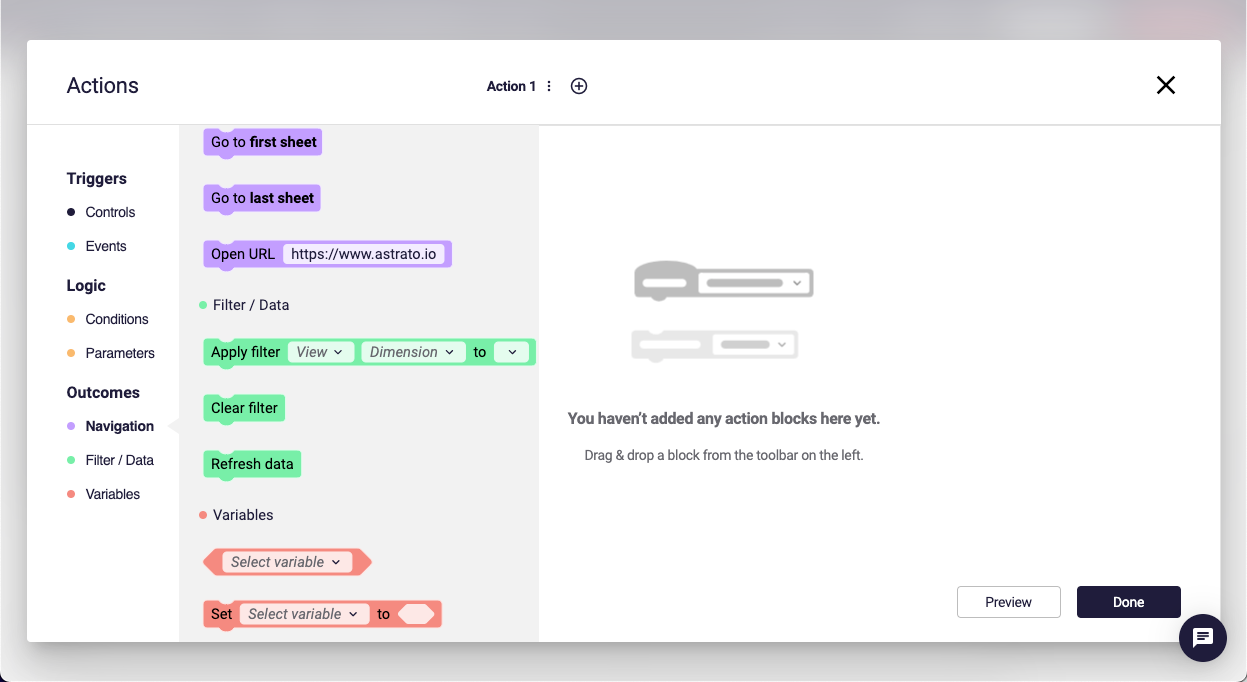
When a user adjusts a value – say, a budget line or a forecast assumption – that writeback isn’t an isolated event. It becomes the first domino in a governed workflow: business logic runs instantly in the warehouse, relevant managers are alerted, and the approval happens directly in the interface where the change originated.
Once approved, the underlying model recalculates in real time, and the entire sequence is logged automatically for auditability.
On conversations with customers, this is the moment prospects lean in and ask the same question:
“Can this recalculate automatically when someone approves?”
Yes. And that’s precisely the point.
In a workflow-enabled BI environment, a writeback is only the first step. A common pattern emerges across forecasting, budgeting, and revenue workflows: Action → writeback → stored procedure → model recompute.
Approval stops being a side conversation in email and becomes part of the analytical workflow itself: context-rich, traceable, and powered by live data instead of digital guesswork. It’s a decision process that finally lives where decisions are made.
3. Automated Actions as the no-code logic layer
If writeback is what gives BI its hands, automated actions are what finally give it a brain.
They transform dashboards from reflective surfaces into responsive systems – interfaces that don’t just display outcomes but actively shape them.
For years, teams have asked for small, seemingly simple abilities: to mark something as approved, assign an owner, trigger a risk check, escalate an exception, refresh the surrounding KPIs, or open the next step in a workflow.
None of these requests sound radical. Yet in traditional BI, every one of them requires duct tape: custom scripts, standalone apps, or an engineer willing to wire everything together.
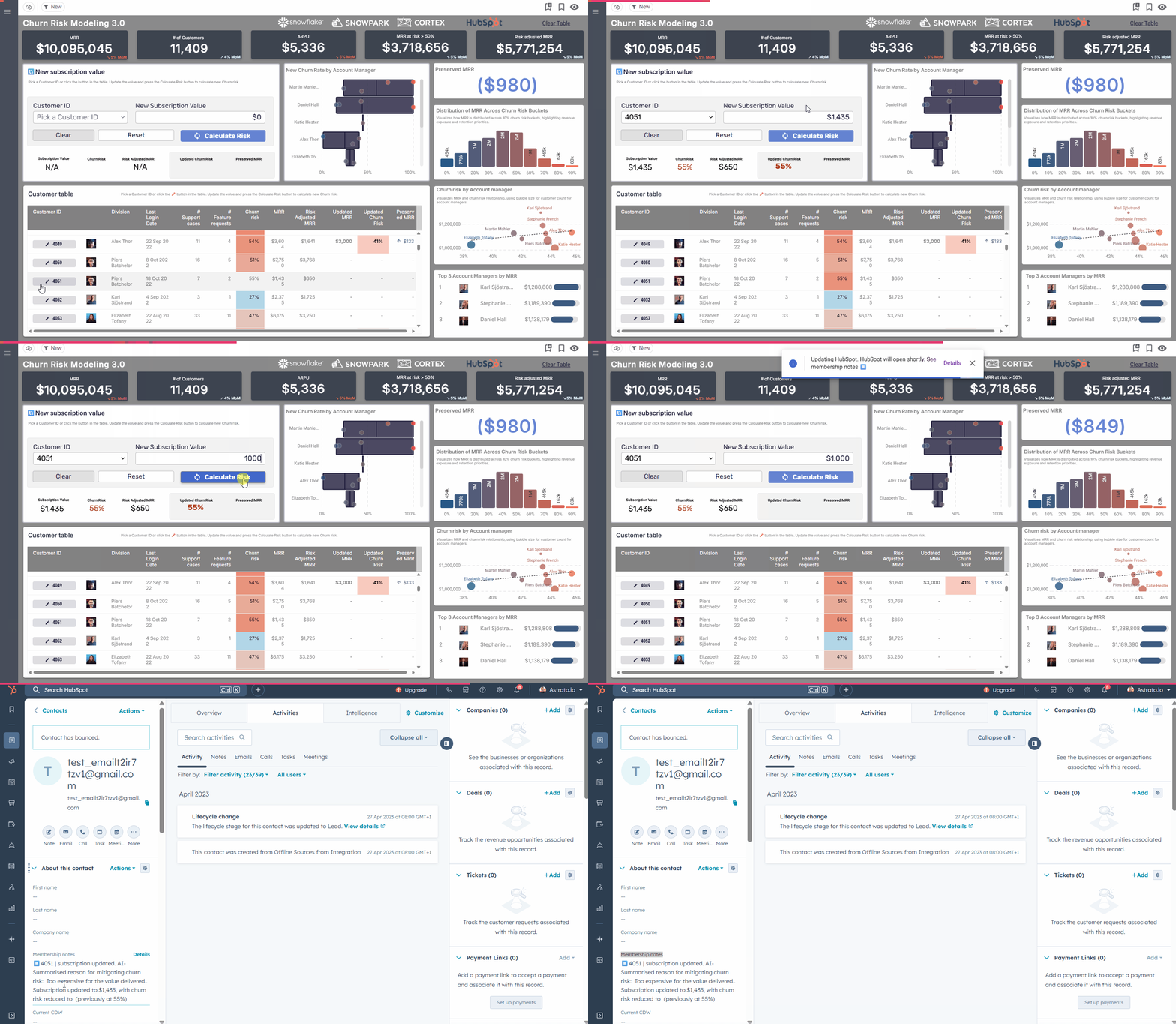
Actions change that dynamic. They allow real business logic to run the moment a user interacts with the data, without writing a single line of code. A click becomes a signal. A signal becomes a stored procedure. A stored procedure becomes a decision reflected instantly across the analytical layer. The workflow that once lived across five tools now unfolds inside one.
Teams encountering this model for the first time often describe an almost subversive realization: “We could replace our internal tool with this.”
And they’re right. Once the BI layer can trigger logic, enforce rules, and coordinate state changes across the warehouse, it stops behaving like a reporting interface and starts acting like a data application – governed, auditable, and deeply connected to the operational reality of the business.
Platforms like Astrato amplify this shift by making actions fully no-code. Business teams can design workflows without waiting for engineering cycles and analysts can build process logic without touching backend systems. The result is a workflow engine that scales at the pace of the organization, not the bottlenecks of the dev queue.
Actions turn insight into intention, and intention into outcome.
4. Collaboration workflows: conversation meets governance
Of all the cracks in the modern analytics stack, collaboration is the one teams feel most viscerally.
The moment a number sparks a question, the discussion vanishes into other tools. A dashboard screenshot becomes a Slack message, which becomes a thread, which becomes a file someone downloads and annotates, which becomes an email with the subject line “Any idea what’s happening here?”
By the time the team arrives at an answer, the data has changed, the context has evaporated, and the decision-making trail is scattered across half the company’s digital infrastructure.
What teams are really asking for – though they rarely say it explicitly – is the ability to talk about the data where they actually see the data.
They want commentary anchored to the number it refers to, questions tied to the event that prompted them, and decisions recorded in a way that doesn’t dissolve into Slack’s memory hole. They want transparency without chaos and context without archaeology.
Collaboration workflows bring that missing layer into the BI surface. A note left on a metric isn’t a side conversation; it becomes part of the analytical record. A question about regional performance is visible only to the people who should see it, enforced through the same role-level security that governs the data itself. A decision captured inline is stored with complete lineage, not scattered across inboxes. And because comments are writeback events too, the warehouse doesn’t just store the numbers – it stores the reasoning behind them.
One user captured the dysfunction of the old model perfectly: “People email numbers around. Nobody knows which version is real.”
Collaboration workflows dismantle that problem at the root. They turn BI into a shared workspace – one where context stays attached, decisions stay visible, and the conversation finally returns to the place it always belonged.
What BI Workflows Look Like in the Real World
If you want to understand the stakes of BI workflows, you don’t start with a diagram. You start with the real processes – the ones that expose where organizations slow down, lose context, or fall out of sync. And no process reveals those fault lines more dramatically than budgeting.
Case Study: A global budget cycle, rebuilt for the workflow era
Every October, a global media company begins its budgeting ritual. Branches, departments, and regional teams each receive slightly different versions of Excel templates – publishing here, neighbouring rights there, US departments working off their own bespoke structure.
These files travel across continents, bouncing between budget submitters and Regional Finance Directors who review them in parallel before everything eventually cascades into Corporate Finance.
The entire process stretches into March.
The pain points are painfully familiar:
- Communication fractures across regions.
- No one has real-time visibility into which budgets are “in review”, “submitted”, or simply missing.
- Creating a global view requires manual stitching and heroic patience.
- Version control collapses under overlapping submissions.
- Audit trails rely more on memory than metadata.
As one finance director told us: “We’re not budgeting – we’re chasing files.”
This is exactly the kind of scenario BI workflows were built to solve.
With a warehouse-native, workflow-enabled platform like Astrato, the budgeting cycle moves from a fragmented Excel ecosystem into a governed, interactive surface:
- Instead of emailing templates, teams work from one centralized data model.
- Regional and branch submitters update numbers directly in live dashboards via writeback.
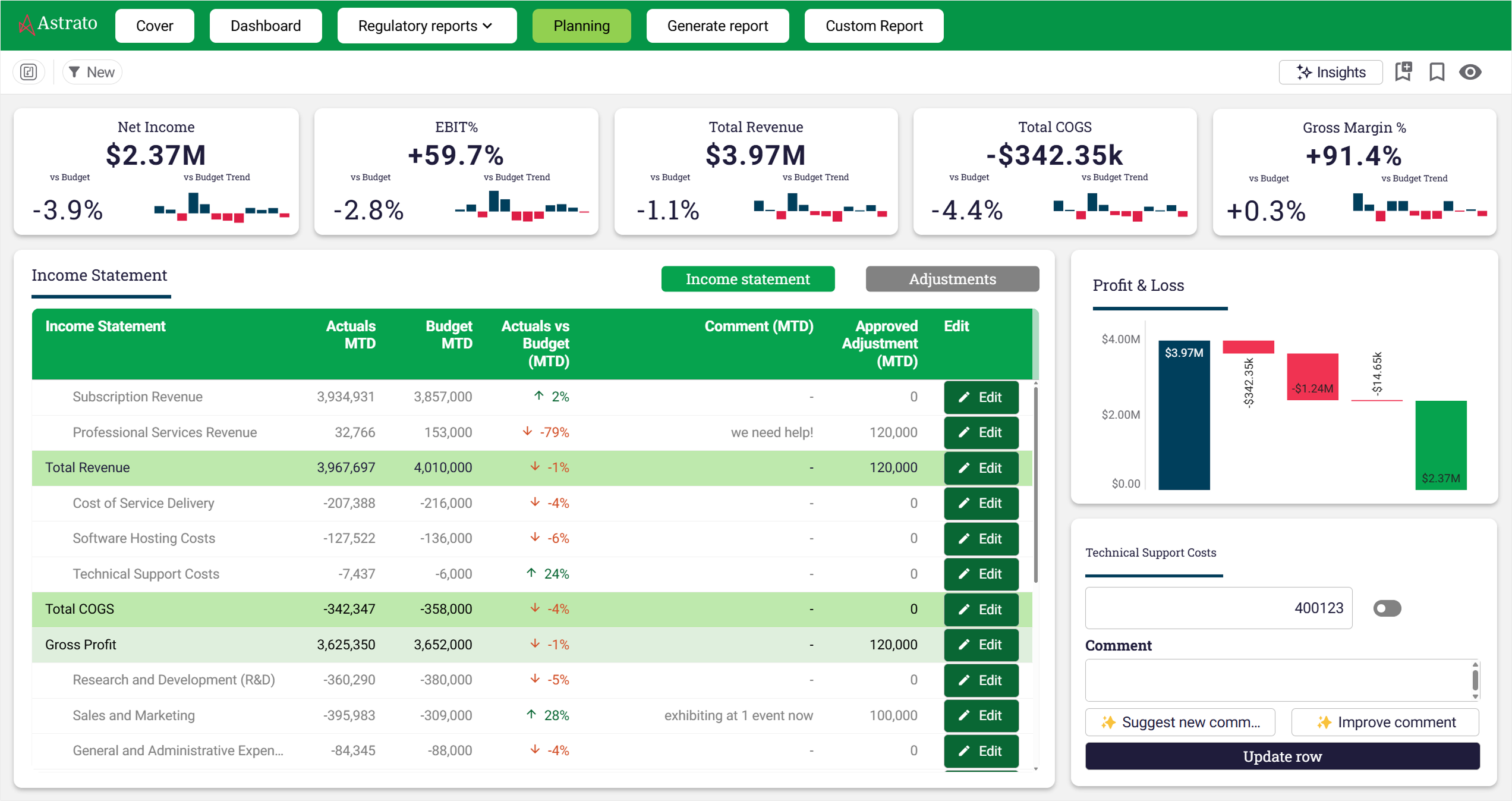
- Each budget moves through a clear lifecycle: Preparation → Submitted → In Review → Approved — with stage and assignee always visible.
- Commentary becomes structured, timestamped writeback data, preserved through every version.
- Notifications fire automatically as budgets progress from one reviewer to the next.
- Corporate Finance gets real-time visibility across all submissions globally.
- Reviewers can compare versions side-by-side, seeing exactly what changed, when, and who changed it.
- Once approved, a version becomes immutable – and trusted.
What once required custom apps, manual coordination, and scattered spreadsheets now becomes a structured, transparent, collaborative engine, running directly on the warehouse and orchestrated through Astrato.
Supply Chain: Fixing exceptions before they become problems
Supply chain workflows often unravel not because they’re complex, but because the context evaporates.
A cost spike appears; someone screenshots it; a Slack thread forms; three people try to remember who last updated what.
One supply chain manager described the chronic issue: “Half our escalations are figuring out who changed what and why.”
With BI workflows, exceptions become structured events. An analyst flags the anomaly directly on the dashboard, adds context, assigns an owner, and triggers validation logic in the warehouse. Approvals happen inline. Every action is logged and visible. The exception moves through resolution, not through Slack.
Pricing and Revenue: approvals without the email maze
Discount requests and pricing exceptions often travel through long, brittle chains of forwarded emails. What should take minutes can take days simply because the data and the decision are separated by tools, time zones, and attachments.
“We spend more time finding the approval than approving it” is how many analysts describe their internal processes.
Workflow-enabled BI collapses that maze.
A rep submits a request directly in the interface, finance reviews the request with full context, approval triggers warehouse updates, dashboards refresh instantly. 😌
The pricing workflow stops being a scavenger hunt and becomes a governed loop.
Healthcare Case Reviews: decisions with memory
In healthcare operations, case reviews are often accompanied by PDF files, shared-drive folders, and undocumented conversations. The clinical logic that drives decisions can easily get lost.
A clinical operations lead described the issue clearly: “We were losing decisions because we were losing the conversations.”
Inside a workflow-enabled BI layer, clinicians update case statuses, reviewers annotate inline, and approvals move through clearly defined steps.
Every note becomes structured, governed data attached to the underlying record. This way, decisions don’t disappear – they accumulate as shared intelligence.
Customer Portals: user inputs without fragility
Customer-facing workflows tend to be the most fragile, especially when customers can change onboarding fields, update preferences, or submit structured data.
In many organizations, these updates travel into custom tools or manual processes, not the warehouse.
A product manager admitted: “We built an entire internal tool just to handle what users change on forms.”
With BI workflows, customer changes write back directly to the warehouse. Validation logic runs instantly. Internal teams review and approve the update in context. Dashboards reflect reality in real time.
The BI layer becomes the operational layer, not just the reporting layer.
The 5 Practical Benefits of BI Workflows
Dashboards tell you what’s happening, but workflows decide what happens next.
And once that shift takes hold, the day-to-day experience of work changes in ways that are both practical and profound.
1. One workspace instead of five
Modern workflows collapse the scattered choreography of Excel files, Slack messages, email threads, and exported PDFs into a single governed interface.
Teams no longer jump between tools to interpret a number, question it, adjust it, approve it, and communicate the change. They do it all in one place – where the data already lives.
A finance lead described the relief succinctly: “If we could work in one system instead of five, half our chaos would disappear.”
With workflows, it does.
2. From days to minutes
When the reviewer sees the request, the context, the history, and the downstream impact all in one interface, approvals that once stretched across days collapse into minutes.
No chasing status updates. No waiting for attachments. No reassembling context.
The decision-making cycle becomes instant because the information and the action finally sit side by side.
3. Accuracy by architecture
Exports die.
So do offline edits, rogue templates, and mysterious versions labeled “final_v7_REAL_FINAL.”
With workflows running directly on the warehouse, every update is live, every calculation is current, and every decision flows from the same dataset.
Accuracy stops being a governance problem and becomes a structural guarantee.
4. Governance that doesn’t require policing
In a workflow-enabled BI layer, every comment, update, and approval is tied to a real user, timestamped, and logged automatically.
There is no need to audit email trails or reconstruct who touched what. The system enforces lineage by design.
Governance stops being a rulebook and becomes the default behavior of the platform.
5. Adoption that feels natural
People return to BI when BI becomes the place where the work actually happens.
When users can submit a request, annotate a metric, assign an owner, or approve a change – all inside the dashboard – the BI layer stops being a passive reporting tool and becomes an active workspace.
Because workflows remove friction and people gravitate toward the tools that remove friction.
Why Astrato is built for the future of BI Workflows
Astrato wasn’t an afterthought added to dashboards. It was conceived from day one as a live, operational layer on top of your data warehouse – the kind of platform that transforms passive reporting into active decision-making.
Live-query, warehouse-native foundation
Astrato connects directly to cloud data warehouses – Snowflake, BigQuery, Databricks, and others – using a zero-copy, live-query engine.
That ensures dashboards and workflows always reflect live data, with no extracts, no stale snapshots, and no version drift.
Your data remains governed, centralized, and always up to date.
Writeback and no-code actions: BI with hands and a brain
Astrato enables true writeback: users can edit data directly in dashboards, and those changes flow back into warehouse tables.
Paired with Action Blocks, you get no-code triggers for workflow logic: status updates, approvals, form submissions, or any operational action – all executed from within the same interface.
This combination turns dashboards into interactive data apps – not just places to read numbers, but places to act on them.
Warehouse logic & governance: computation where it belongs
Because Astrato sits on top of your warehouse, the heavy lifting stays where it belongs.
Calculations, business logic, stored procedures, or complex transformations happen inside the data warehouse, under the governance and security controls you already manage. Astrato simply provides the interface.
That means data lineage, permissions, and history remain intact, even as users collaborate, approve, or update data.
Collaboration, context & embedded workflow: all in one pane of glass
With writeback and Action Blocks, comments, status changes, approvals, and data edits all coexist in the same interface, tied directly to the underlying data.
This eliminates the classic BI problem of “context lost across tools”. Instead of exporting, emailing, and re-importing, teams collaborate in context. Everything stays connected, traceable, and governed.
Self-Service and scalability: for analysts and business users alike
Astrato’s no-code UI and drag-and-drop dashboarding let both technical teams and business users build, explore, and act without SQL.
Because it’s built on warehouse-native architecture and designed for cloud performance, Astrato scales gracefully, whether you’re embedding analytics for tens of users or thousands.
🧭 What This Means in Practice
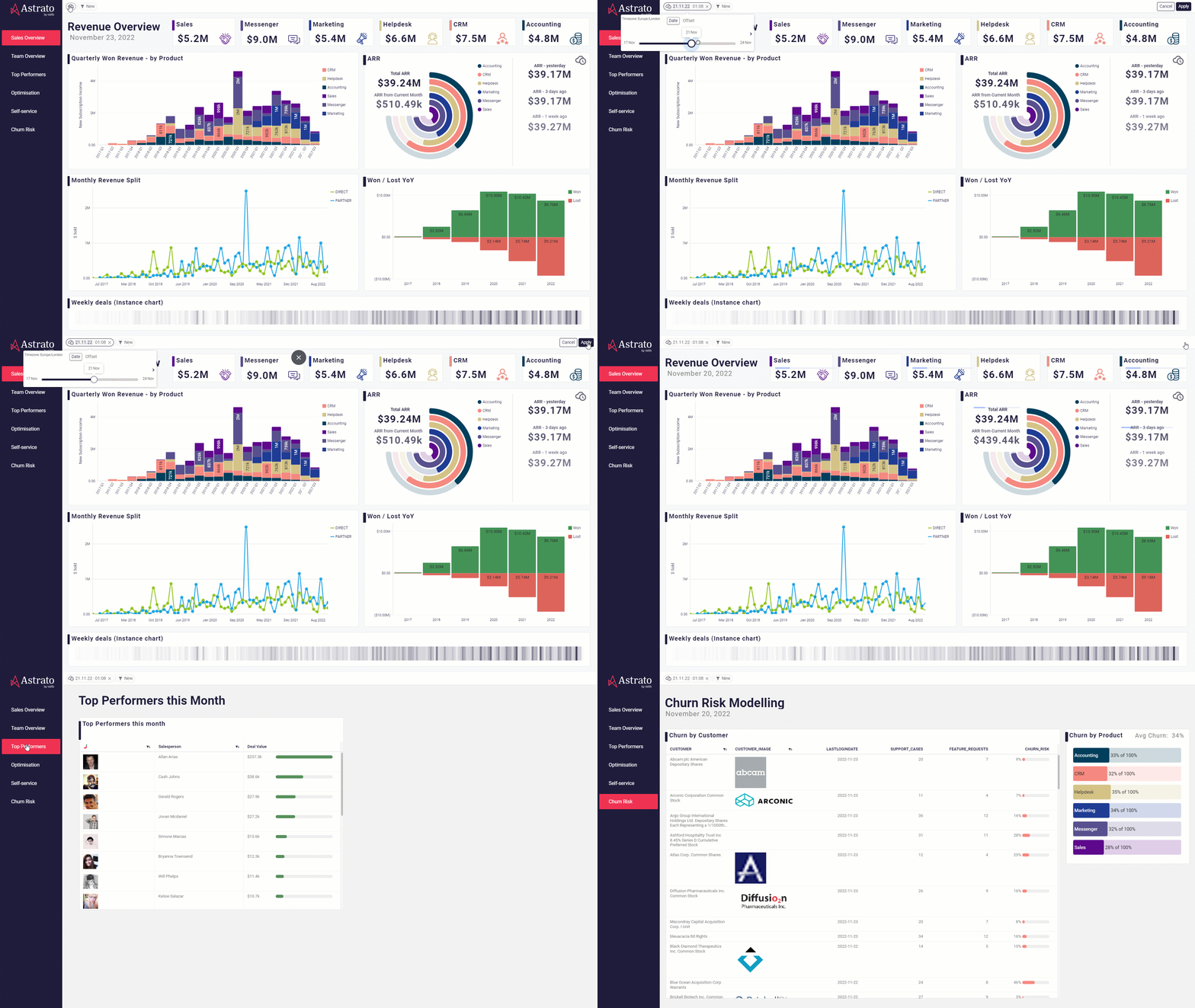
- No more “reports → exports → spreadsheets → re-import → final reporting”. Instead: live data → edit → approve → recalc → insight — all in one flow.
- The warehouse becomes the operational engine. Astrato becomes the interface where workflow, governance, and collaboration meet.
- BI no longer sits at the end of a process – it becomes the process itself.
For teams drowning in spreadsheet chaos, email round-trips, version confusion, and outdated data, Astrato isn’t just a little better. It redefines what BI can do.
The Future of BI Is Workflows, Not Dashboards
For years, BI tools have served as observation decks: places to inspect the business but not to change it. Insights lived in one system, decisions in another, and the messy work in between was forced into spreadsheets, email threads, and side-channel conversations.
BI workflows collapse that divide. They bring updates, approvals, commentary, and logic into the same environment where the data already lives. When writeback updates tables directly, when approvals happen beside the numbers they affect, when conversations stay attached to the metrics they reference, the BI layer stops being a report and becomes an operating system.
The impact is structural. Data stays live because nothing leaves the warehouse. Decisions become traceable because the workflow is inherently governed. Teams align because they finally work from the same surface instead of stitching together parallel processes.
This evolution has been a long time coming. BI was always supposed to support decisions, not just describe them. With warehouse-native, workflow-driven platforms like Astrato, that promise is finally materializing.
The future of BI isn’t more dashboards. It’s a unified workflow layer where insight and action meet.



.avif)


